HackTheBox Write-up: Windows Fundamentals
This write-up walks through my step-by-step approach to completing the HTB Academy Windows Fundamentals module, focusing on practical Windows enumeration techniques used in real-world engagements.


This write-up explains my process for solving the questions in the HTB Academy Windows Fundamentals module.
What is the Build Number of the target workstation?
I started this problem by RDP-ing into the Windows host using the provided credentials.
$ xfreerdp /v:<IP> /u:htb-student /p:<PASSWORD>Once on the host, I opened PowerShell and enumerated the host. Using the Get-WmiObject command with the -Class win32_OperatingSystem argument provided basic information about the machine's operating system.
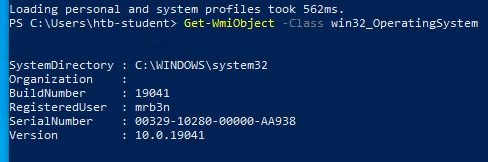
The build number is 19041
Answer: 19041
Which Windows NT version is installed on the workstation? (i.e., Windows X - case sensitive)
The output from the previous command Get-WmiObject -Class win32_OperatingSystem provided this answer as well. The version number is 10.0.19041.
Therefore, Windows 10 is installed on the workstation.
Answer: Windows 10
Find the non-standard directory in the C drive. Submit the contents of the flag file saved in this directory.
By running the tree c:\ /f | more command, I saw that the flag file was located at C:\Academy\flag.txt.
Folder PATH listing                                                                 Volume serial number is 905B-28C3                                                   C:\                                                                                 ├───75afac25577675a9bfafd2405602                                                    ├───Academy                                                                         │       flag.txt                                                                    │                                                                                   ├───PerfLogs                                                                        ├───Program Files
<SNIP>
I then opened the file via the terminal by running C:\Academy\flag.txt.
Answer: c8fe8d977d3a0c655ed7cf81e4d13c75
What system user has full control over the c:\users directory?
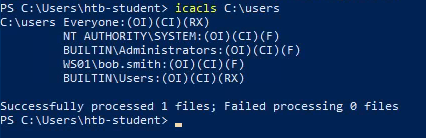
By running the icacls C:\users command, I discovered that bob.smith had full control over the directory.
This is denoted by the (F) in the command output. Additional access permissions are outlined below:
F: full accessD: delete accessN: no accessM: modify accessRX: read and execute accessR: read-only accessW: write-only access
What protocol discussed in this section is used to share resources on the network using Windows? (Format: case sensitive)
The Server Message Block (SMB) protocol is used to share resources in Windows environments.
Answer: SMB
What is the name of the utility that can be used to view logs made by a Windows system? (Format: 2 words, 1 space, not case sensitive)
The Windows Event Viewer is used to view logs captured by a Windows system.
Answer: Event Viewer
What is the full directory path to the Company Data share we created?
The following share was created on the Windows Host:
Answer: C:\Users\htb-student\Desktop\Company Data
Identify one of the non-standard update services running on the host. Submit the full name of the service executable (not the DisplayName) as your answer.
I answered this problem by opening Task Manager on the machine. I initially searched for the service using PowerShell's Get-Service cmdlet, but was quickly overwhelmed by the large number of running services.
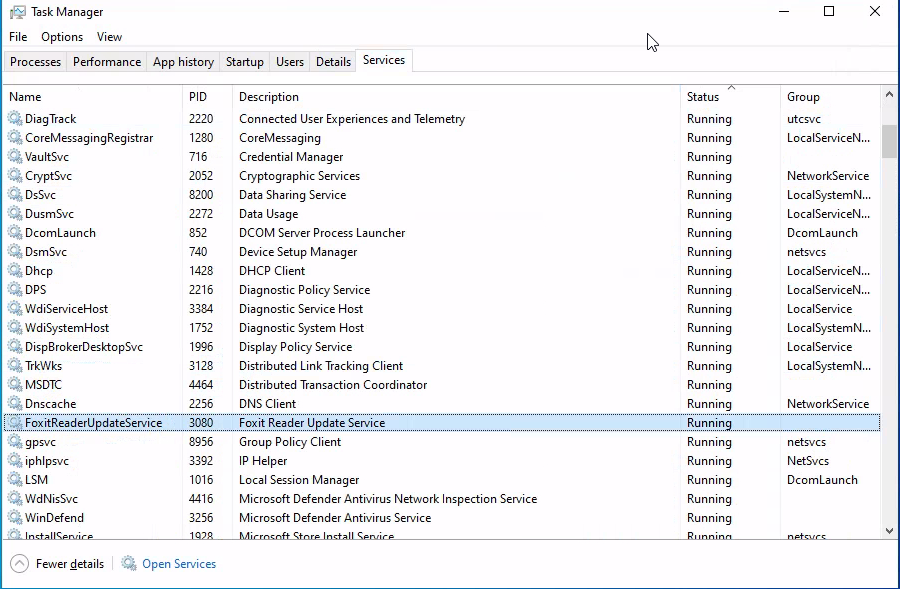
In the Services tab of Task Manager, I found a running service called "FoxitReaderUpdateService". This is definitely not a standard service.
To locate the service executable, I opened the Details pane in Task Manager. I then hovered over the service and was given the executable name.
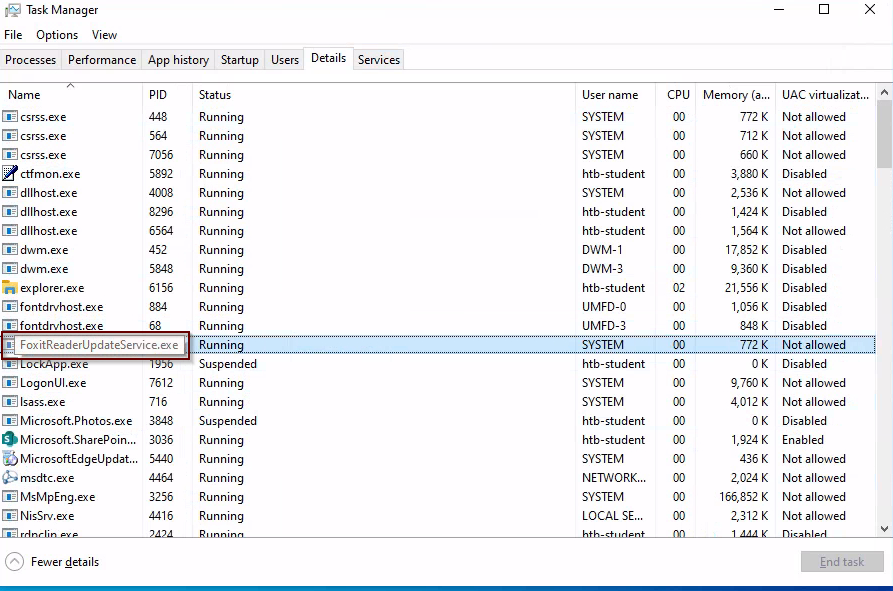
Answer: FoxitReaderUpdateService.exe
What is the alias set for the ipconfig.exe command?
Answer: ifconfig
Find the Execution Policy set for the LocalMachine scope.
By running the Get-ExecutionPolicy -List command in PowerShell, I found the Execution Policy for the LocalMachine scope.
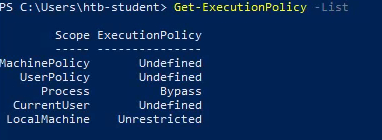
Answer: Unrestricted
Use WMI to find the serial number of the system.
I ran the command wmic os list brief to find the serial number of the system.

Answer: 00329-10280-00000-AA938
Find the SID of the bob.smith user.
I used WMIC to answer this question, but there are many solutions to this problem. I used the following command to reveal the SID of the bob.smith user:
wmic useraccount where name="bob.smith" get sid

Similarly, PowerShell can be used to get the SID. I used the following command:
Get-LocalUser | Where-Object { $_.Name -eq "bob.smith" } | Select-Object Name, SID

Answer: S-1-5-21-2614195641-1726409526-3792725429-1003
What 3rd party security application is disabled at startup for the current user? (The answer is case-sensitive).
I started this problem by narrowing the scope of my investigation. I started with the "Run and RunOnce" registry keys which support software and files loading into memory when the OS is started or a user logs in.
Those keys are:
HKEY_LOCAL_MACHINE\Software\Microsoft\Windows\CurrentVersion\Run
HKEY_CURRENT_USER\Software\Microsoft\Windows\CurrentVersion\Run
HKEY_LOCAL_MACHINE\Software\Microsoft\Windows\CurrentVersion\RunOnce
HKEY_CURRENT_USER\Software\Microsoft\Windows\CurrentVersion\RunOnceI looked through the registry and found a list of startup programs at
\Software\Microsoft\Windows\CurrentVersion\RunHowever, there was no information to indicate if the programs were disabled.
After a brief search, I learned that the HKEY_CURRENT_USER\SOFTWARE\Microsoft\Windows\CurrentVersion\Explorer\StartupApproved\Run key stores whether a startup program is enabled or disabled. A value of "02 00 00 00..." typically means a program is enabled. Any other value means the application is disabled.
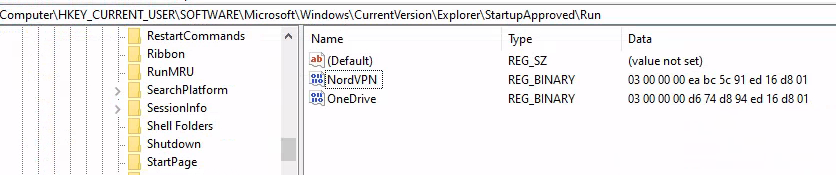
Thus, both NordVPN and OneDrive are disabled at startup.
Answer: NordVPN
Skills Assessment
What is the name of the group that is present in the Company Data Share Permissions ACL by default?
I created the shared folder called "Company Data" and then viewed the permissions in the Advanced Sharing menu.
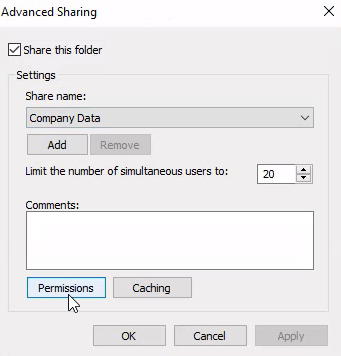
This revealed the default permission of "Everyone".
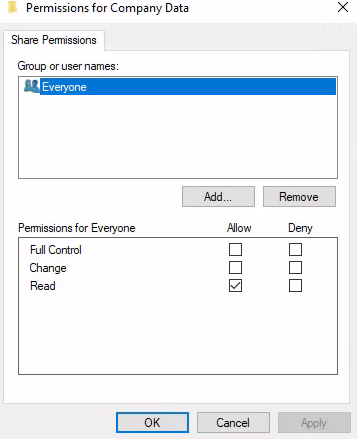
Answer: Everyone
What is the name of the tab that allows you to configure NTFS permissions?
I began the second challenge, creating a user named Jim, by entering the Computer Management application.
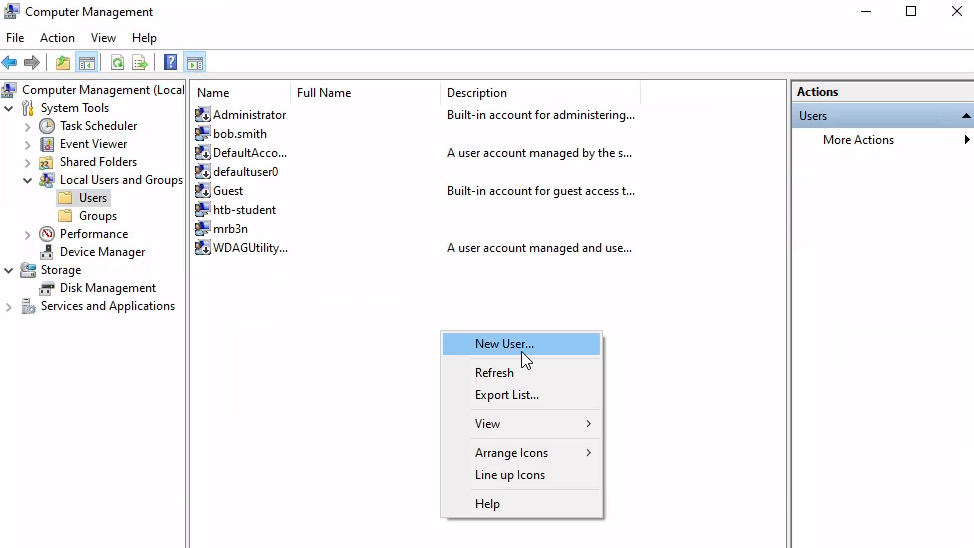
Once I created the user, I created the HR security group by going to the "Groups" menu in the Computer Management application.
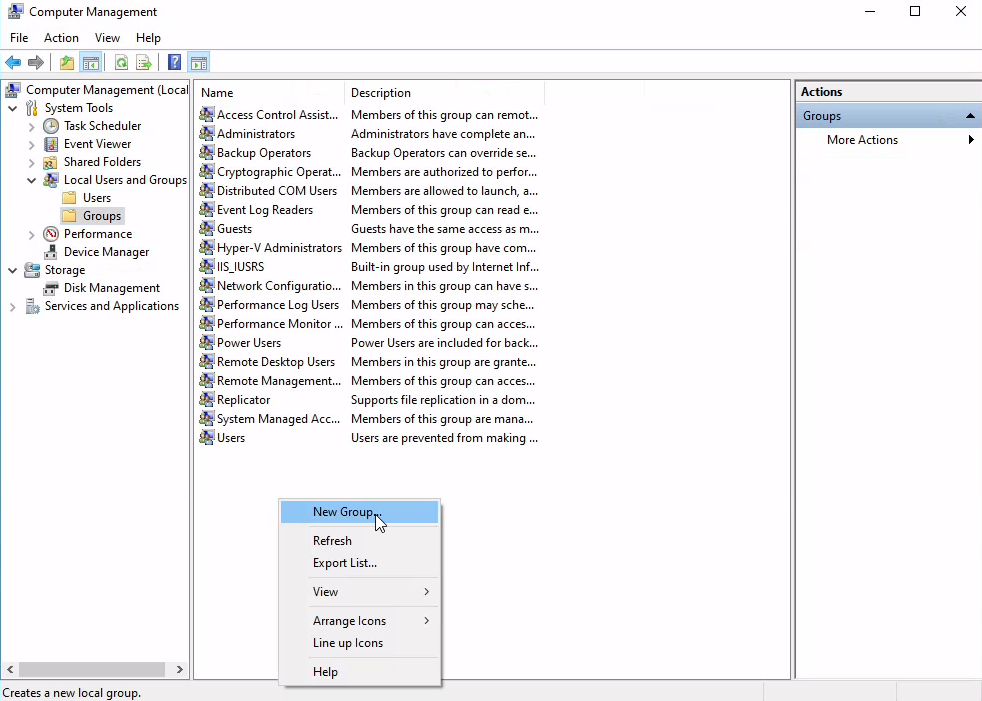
I then added Jim to the HR security group.
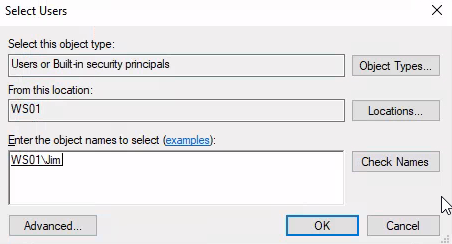
Then, according to the directions, I removed the "Everyone" group from the Company Data folder and added the "HR" group to the folder.
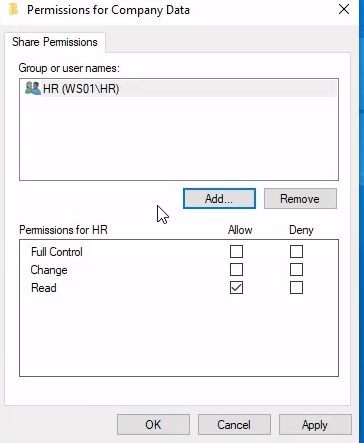
Then I set the NTFS permissions from the Security tab using the "Advanced Security Settings for Company Data" menu.
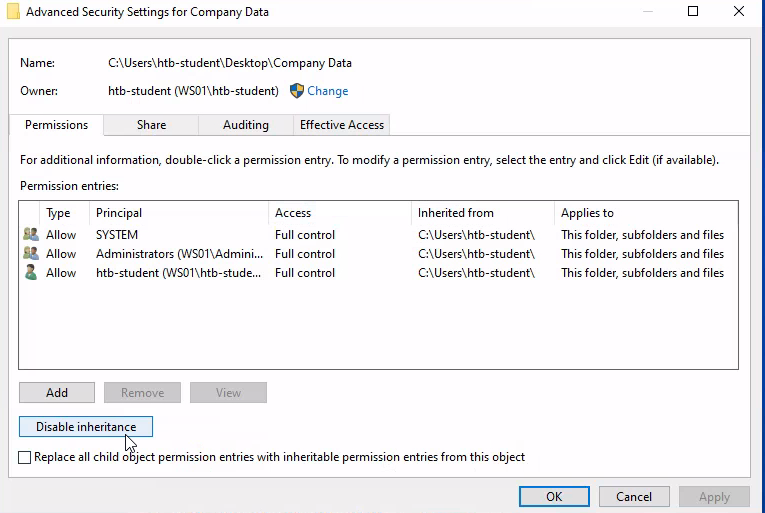
Then I disabled inheritance and added the specified permissions for the HR security group. I then repeated the same process for the "HR" folder.
Answer: Security
What is the name of the service associated with Windows Update?
I then used PowerShell to wrap up the final questions in the skills assessment. I solved this problem by filtering the results of the Get-Service command.
Command: Get-Service | Where DisplayName -like "windows update"

Answer: wuauserv
List the SID associated with the user account Jim you created.
I took a similar approach with this question. I used the Get-LocalUser command and queried for Jim's SID.
Command: Get-LocalUser -Name Jim | Select-Object -Property sid
Answer: S-1–5–21–2614195641–1726409526–3792725429–1006
List the SID associated with the HR security group you created.
To answer this question, I used the Get-LocalGroup command and queried for the SID of the HR group.
Command: Get-LocalGroup -name HR |Select-Object -Property sid
Answer: S-1-5-21-2614195641-1726409526-3792725429-1007
Thank you for visiting the site! If you enjoyed this post, please consider subscribing to my mailing list. I periodically post write-ups, security analyses, and whatever I find interesting. 😄


